Solved

Migrating KPIs / Variables to Knowledge Model

  • Jul 20, 2022 5:31 PM UTC
  • 10 replies
  • 214 views

I noticed that PyCelonis has some functionality in adding records, variables and the like into Knowledge Models but I was wondering if there was a script or way we could mass import/add variables or KPIs from Process Analytics into a Knowledge Model.


I've got a script that extracts and formats all KPIS and Variables into a pandas dataframe so it's just a matter of calling the right function. I don't really see any examples on the PyCelonis Github in terms of adding variables/KPIs

Best answer by Jan-Peter van der Steege

Okay I got to that point as well (phew). I guess my question now is how to insert. I can format the previous formulas, variables, etc. to match the dictionary appropriately. What I'm missing is whatever the append() or like function for adding KPIs to a knowledge model is using PyCelonis.

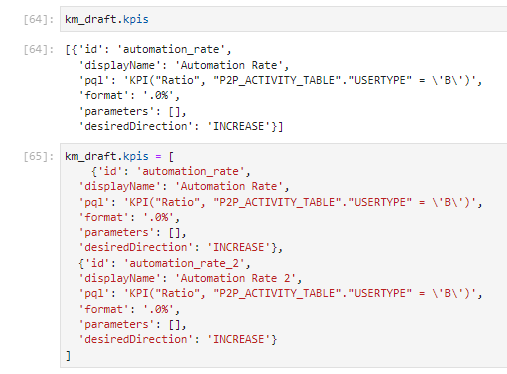
You can do this if you follow the draft steps in my example, and then do the following action:

km_draft.kpis = <your_list_of_kpi_dicts>


So, you can assign them in a draft version by using just the '=' command (see screenshot below, which runs without errors.


Good luck!


Kind regards,

Jan-peterkm_kpis_test_assign_kpis

View original

10 replies

Jan-Peter van der Steege
Community MVP
Forum|alt.badge.img+28

Hi @matthew.witty,


Good question! As fas as I know, there is indeed not an out-of-the-box script that handles this, so you have to create it yourself. It might be that the syntax is a bit different on how the KPIs are stored, but I'm not sure about that.


Kind regards,

Jan-peter


  • Jul 22, 2022 11:49 AM UTC

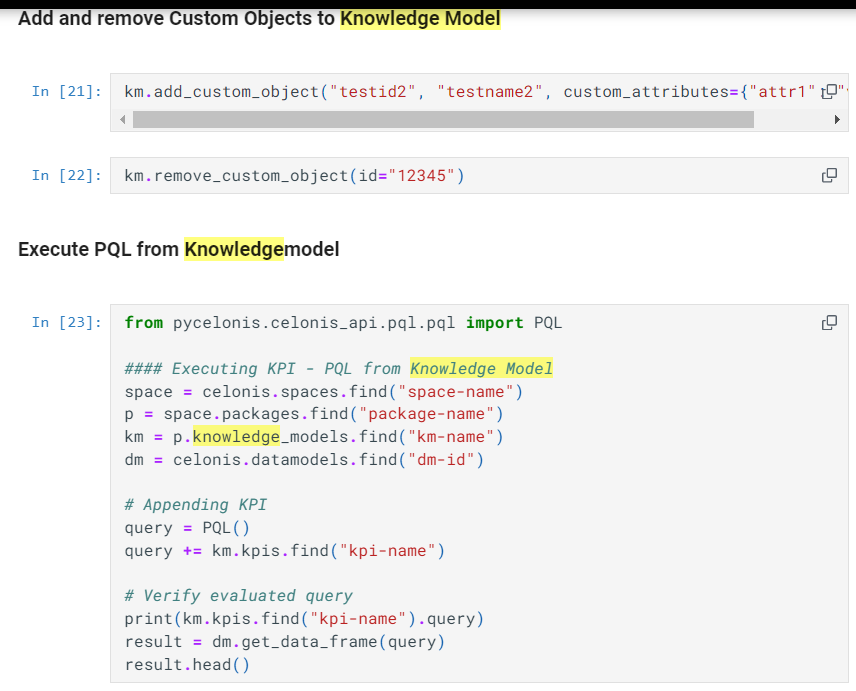
PyCelonis Knowledge Model CodeSo I found this section in the PyCelonis Github but I'm not really understanding the syntax for inserting/appending KPIs since we're also trying to find the KPI? If there's something that explains that section a little better, I think I could figure it out.

  • Jul 22, 2022 12:02 PM UTC

I'd explore the object Knowledge_model to see which properties and methods has. associated - use help(object) or dice(object)


Also, I am pretty sure the object Knowledge model will have some sort of json or serilized content (like the .data of analysis.draft ) and there should be some part describing the KPIs'


Exploring that in python is in my "to-do-some-wonderful-day-when-I-have-free-time" list :P


  • Jul 22, 2022 12:19 PM UTC

It does have a KnowledgeModelDraft. However, I'm still unsure on how to call it. I have built out a script that extracts all variables and KPIs from process analytics and was hoping to do a "mass insert" so to speak using some for loops.


I'll check out the methods associated and see if there's something there. Much appreciated!


  • Jul 22, 2022 1:03 PM UTC

For example this is the part of code to update the KPI's of an analysis in Studio, and to modify and update the .data structure (that is just a json)


This copies the variables from 1 analysis to other

    doc_v=analysis_orig.draft.data["document"]["variables"]

    json_doc_dump_v = json.dumps(doc_v, ensure_ascii=False)

    doc_v = json.loads(json_doc_dump_v)

    analysis_dest.draft.data["document"]["variables"] = doc_v


This the KPI's

   for key in analysis_orig.saved_formulas.names:

      new_formula_created=\\

        analysis_dest.create_saved_formula(\\

          name=analysis_orig.saved_formulas.find(key).data['name'], \\

          description='', \\

          template=analysis_orig.saved_formulas.find(key).data['template'], \\

          parameters=None)


This is an update of the analysis.draft.data

    analysis_dest.draft.data["document"]["components"]=analysis_orig.draft.data["document"]["components"]


You can even do a full update of a data, like

data_orig =analysis_orig.draft.data

analysis_dest.draft.data = data_orig


Probably will be somehow similar in KM.


HTH

Have fun!


Jan-Peter van der Steege
Community MVP
Forum|alt.badge.img+28

Hi Matthew,


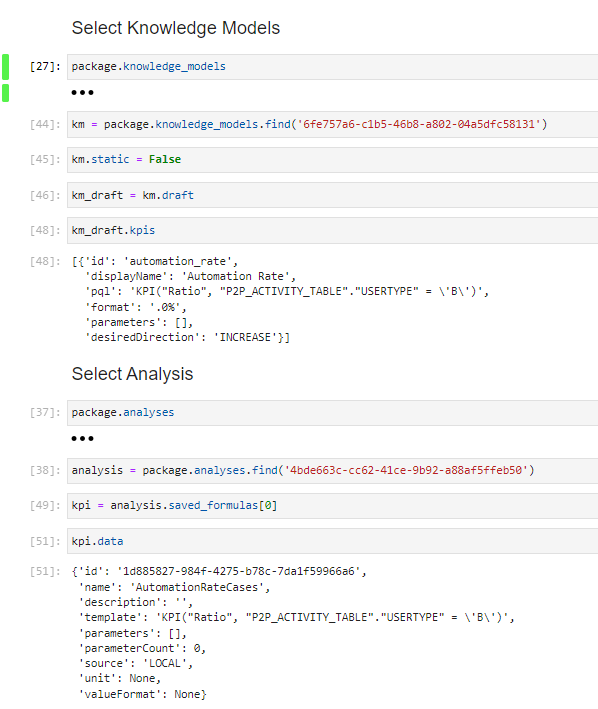
I created a small script to see if the KPIs are in the same format and unfortunately, they are not. It is possible to assign new KPIs to the draft model, but than you have to generate a dict yourself that are extracted from the source analysis, then parsed to the corresponding values in the KM, and than assigned to the KPIs at once.


Kind regards,

Jan-peter

km_kpis_test


  • Jul 22, 2022 2:12 PM UTC

Hi Matthew,


I created a small script to see if the KPIs are in the same format and unfortunately, they are not. It is possible to assign new KPIs to the draft model, but than you have to generate a dict yourself that are extracted from the source analysis, then parsed to the corresponding values in the KM, and than assigned to the KPIs at once.


Kind regards,

Jan-peter

km_kpis_test

Okay I got to that point as well (phew). I guess my question now is how to insert. I can format the previous formulas, variables, etc. to match the dictionary appropriately. What I'm missing is whatever the append() or like function for adding KPIs to a knowledge model is using PyCelonis.


Jan-Peter van der Steege
Community MVP
Forum|alt.badge.img+28

Okay I got to that point as well (phew). I guess my question now is how to insert. I can format the previous formulas, variables, etc. to match the dictionary appropriately. What I'm missing is whatever the append() or like function for adding KPIs to a knowledge model is using PyCelonis.

You can do this if you follow the draft steps in my example, and then do the following action:

km_draft.kpis = <your_list_of_kpi_dicts>


So, you can assign them in a draft version by using just the '=' command (see screenshot below, which runs without errors.


Good luck!


Kind regards,

Jan-peterkm_kpis_test_assign_kpis


  • Jul 22, 2022 2:24 PM UTC

Ah a list of dictionaries. Got it. Jan thank you so much for your help.


Jan-Peter van der Steege
Community MVP
Forum|alt.badge.img+28

Ah a list of dictionaries. Got it. Jan thank you so much for your help.

Ah, yeah, it's a list of dictionairies indeed. I updated my answer accordingly!