
Solved

Hello,I have a problem when uploading a csv file (activity table). After selecting the file only 1 column is returned when oonfiguring the data schema. However i was expecting multilple columns. Please find attached the c file and a screenshot.

  • Jan 19, 2023 9:44 AM UTC
  • 6 replies
  • 191 views

omar.elmou
Level 6
Forum|alt.badge.img
Hello, I have a problem when uploading a csv file (activity table). After selecting the file only 1 column is returned when oonfiguring the data schema. However i was expecting multilple columns. Please find attached the c file and a screenshot. Thanks!

Best answer by Anonymous

That explains Guillermo. Do you have a suggestion how i can transform the csv file in order for make it fit for purpose in Celonis?

Depends on your background/tools. If you manage Linux, you can "clean" it with grep and regex.

With Atom you can do replaces where the matching pattern includes codes for start and end line

If you deal with python, you can read each line, and write out the same line without the first and last character (I think will be something like line[-1:-1] to code that slice )


OR maybe load it into excel, apply text to columns, then clean it with some cell function. And then save as excel and upload the excel instead the csv.


HTH


View original

6 replies

  • Jan 19, 2023 12:01 PM UTC

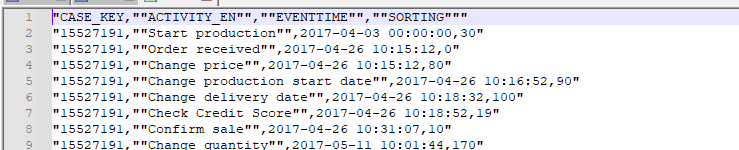
I think your CSV is malformed.


If I open it in a text editor (notepad++, atom, etc...) I see that each line starts with " and ends with " so Celonis interpretes is a single cell


imageHTH


omar.elmou
Level 6
Forum|alt.badge.img
  • Author
  • Level 6
  • Jan 19, 2023 12:52 PM UTC

That explains Guillermo. Do you have a suggestion how i can transform the csv file in order for make it fit for purpose in Celonis?


  • Jan 19, 2023 1:25 PM UTC

That explains Guillermo. Do you have a suggestion how i can transform the csv file in order for make it fit for purpose in Celonis?

Hello Omar,


Please check your .csv file. All columns do not follow the same format. I attach one example.

The date column has various formats.


Screenshot 2023-01-19 141854


  • Answer
  • Jan 19, 2023 1:52 PM UTC

That explains Guillermo. Do you have a suggestion how i can transform the csv file in order for make it fit for purpose in Celonis?

Depends on your background/tools. If you manage Linux, you can "clean" it with grep and regex.

With Atom you can do replaces where the matching pattern includes codes for start and end line

If you deal with python, you can read each line, and write out the same line without the first and last character (I think will be something like line[-1:-1] to code that slice )


OR maybe load it into excel, apply text to columns, then clean it with some cell function. And then save as excel and upload the excel instead the csv.


HTH


omar.elmou
Level 6
Forum|alt.badge.img
  • Author
  • Level 6
  • Jan 19, 2023 5:50 PM UTC

Hello Omar,


Please check your .csv file. All columns do not follow the same format. I attach one example.

The date column has various formats.


Screenshot 2023-01-19 141854

Surprise surpise, didnt know about this one! Thanks Maryam.


omar.elmou
Level 6
Forum|alt.badge.img
  • Author
  • Level 6
  • Jan 19, 2023 5:51 PM UTC

Depends on your background/tools. If you manage Linux, you can "clean" it with grep and regex.

With Atom you can do replaces where the matching pattern includes codes for start and end line

If you deal with python, you can read each line, and write out the same line without the first and last character (I think will be something like line[-1:-1] to code that slice )


OR maybe load it into excel, apply text to columns, then clean it with some cell function. And then save as excel and upload the excel instead the csv.


HTH


Great this solved the problem, i used simple Excel :-)
