Question

Action Flow running out of memory

  • November 8, 2022
  • 9 replies
  • 637 views

I have built an Action Flow that retrieves some data with many query data modules (around 10mb in total), creates some csv files and sends them via email as attachments.


The problem is that every time that I run it, it run to the last query data module and then it starts raising the following warning:

Invoking garbage collector because of high memory usage [used=848035840,max=950000000,timeout=25000]

(with different numbers as used.


The thing is that we are talking about like 10mb of data, so I don't understand what is going wrong.

Also, if I remove the last modules (last query data and last create csv modules), the warning is still present in what previously was the second-last module (that now is the last).


In my last try, this led to a Limit Exceeded in the studio, that I think is not true, since we usually are way more below the limit in terms of amount of data stored.


What am I doing wrong here?

9 replies

abhishek.chatu14
Level 12
Forum|alt.badge.img+8

Hi Federico,


Are you using the Email by Celonis feature to send an email or have you created a SMTP server ?


Kindly note if you are using the Email by Celonis feature there are a few limitations to the same as this action is intended for testing purposes only.


In case you have setup the SMTP server or are using any other mechanisms to send mail try using Enable data loss most probably the module used is exceeding the maximum file that is larger than the maximum allowed size. While Enable data loss may not solve your problem it will point to the same.


Also try limiting the rows in Query Data to 1000 rows to understand if this may be caused by the sheer number of rows being pulled while trying to create the entire flow. In my testing actions flows with Email by Celonis and CSV module tend to fail if more the 5000-6000 rows are added to the entire flow.


Hi Abihshek,


Thank you very much for the answer.

I'm using the SendGrid module to send the email and I can't see Enable data loss option.

Probabily yes, is the amount of data that I'm trying to send, the thing is that I find quite strange that after 5-6000 rows the AF fails, I mean 5000 rows are like nothing in Data Science in general, I think.


Anyway, I'll try to split the AF into two parts, sending two emails.

Thanks!


abhishek.chatu14
Level 12
Forum|alt.badge.img+8

ktrs
Level 2
  • Level 2
  • June 25, 2026

Hello,

this is an ancient thread but even after 3 years this problem seems to be still there.

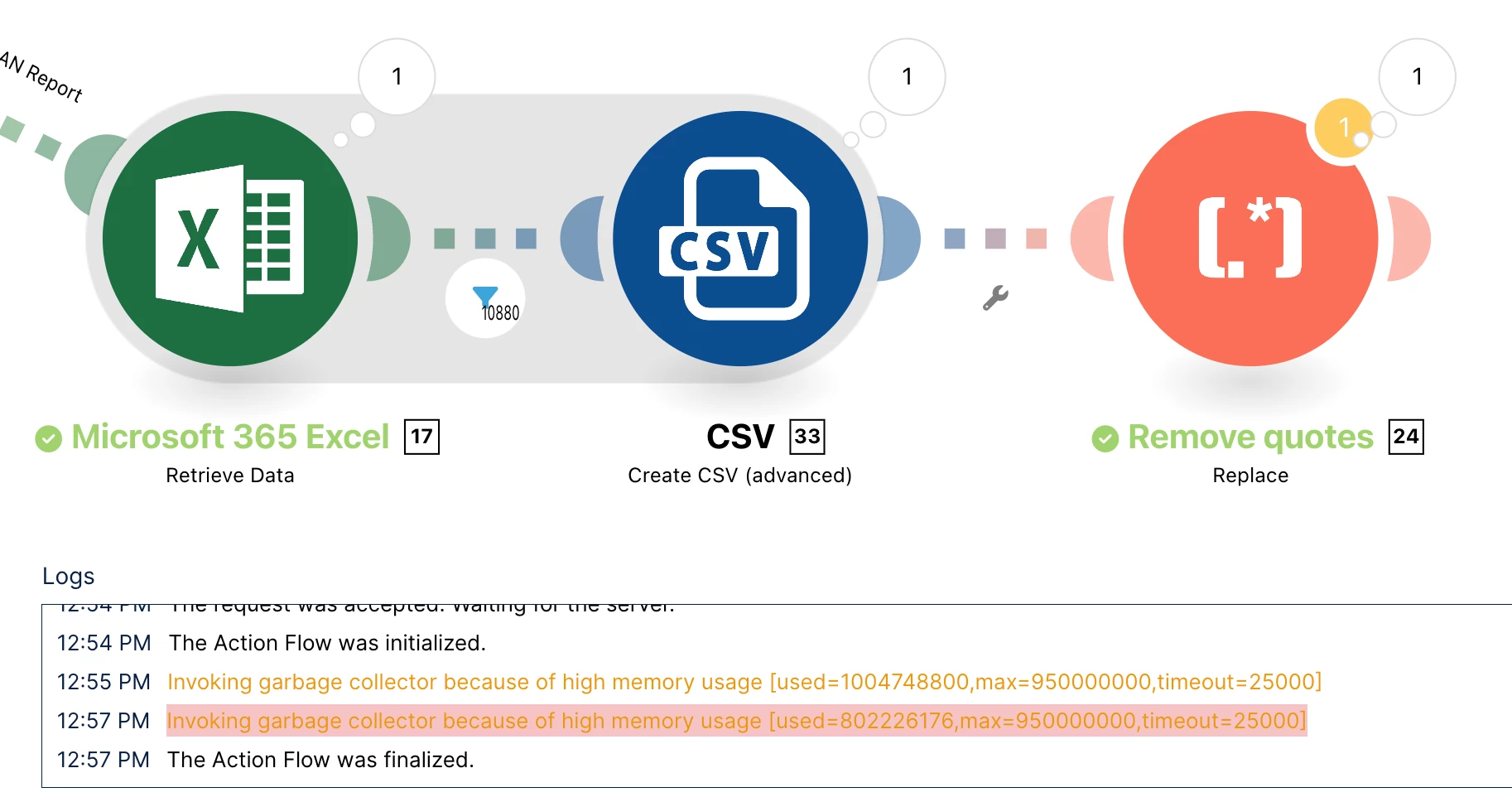
I am reading an Excel file of 5 rows and 30000 rows and create a CSV out of it. The Excel file is as small as 600 KB. Between Excel and CSV module, I have a filter (to exclude empty rows).

By modern standards, this should be a very trivial data processing step. But during the processing of the filter, it’s extremely slow, and I get the warning:

Invoking garbage collector because of high memory usage [used=802226176,max=950000000,timeout=25000]


I enabled “Enable Data loss” but it didn’t help. The scenario runs in the end, but the fact that it stumbles on such a small data volume makes me feel like it will fail at some point. Why does Action Flows struggle with such a small data amount??


abhishek.chatu14
Level 12
Forum|alt.badge.img+8

The warning you're seeing is typically caused by the Action Flow reaching the memory limit during an aggregation step, rather than the Excel file itself being too large.

From what I can see, the filters are being applied after the Office 365 Excel file is retrieved. If possible, apply the filters before processing the file, as this will significantly reduce the amount of data being handled and lower the memory usage.

Although 30,000 rows is not inherently a large dataset, the combination of Excel parsing, row-wise filtering, and CSV aggregation within Action Flows can still be memory intensive.

A better approach would be:

  • Apply the required filters before reading the Excel file.

  • Process or aggregate each filtered subset separately before generating the CSV.

This should help reduce the memory footprint and avoid the aggregation limit.


abhishek.chatu14
Level 12
Forum|alt.badge.img+8

The warning you're seeing is typically caused by the Action Flow reaching the memory limit during an aggregation step, rather than the Excel file itself being too large.

From what I can see, the filters are being applied after the Office 365 Excel file is retrieved. If possible, apply the filters before processing the file, as this will significantly reduce the amount of data being handled and lower the memory usage.

Although 30,000 rows is not inherently a large dataset, the combination of Excel parsing, row-wise filtering, and CSV aggregation within Action Flows can still be memory intensive.

A better approach would be:

  • Apply the required filters before reading the Excel file.

  • Process or aggregate each filtered subset separately before generating the CSV.

This should help reduce the memory footprint and avoid the aggregation limit.


ktrs
Level 2
  • Level 2
  • June 29, 2026

Hi ​@abhishek.chatu14 , thank you for your response.

How can I apply the filters before processing the file? The Excel “Retrieve Data” module doesn’t support any filters. It can only get a certain range.


Is there another module that supports filtering, that I’m not aware of?

Best


abhishek.chatu14
Level 12
Forum|alt.badge.img+8

What I meant was filtering the Excel file before it is pulled into Celonis, i.e., reducing the data at the source if possible, rather than filtering it within the Action Flow.

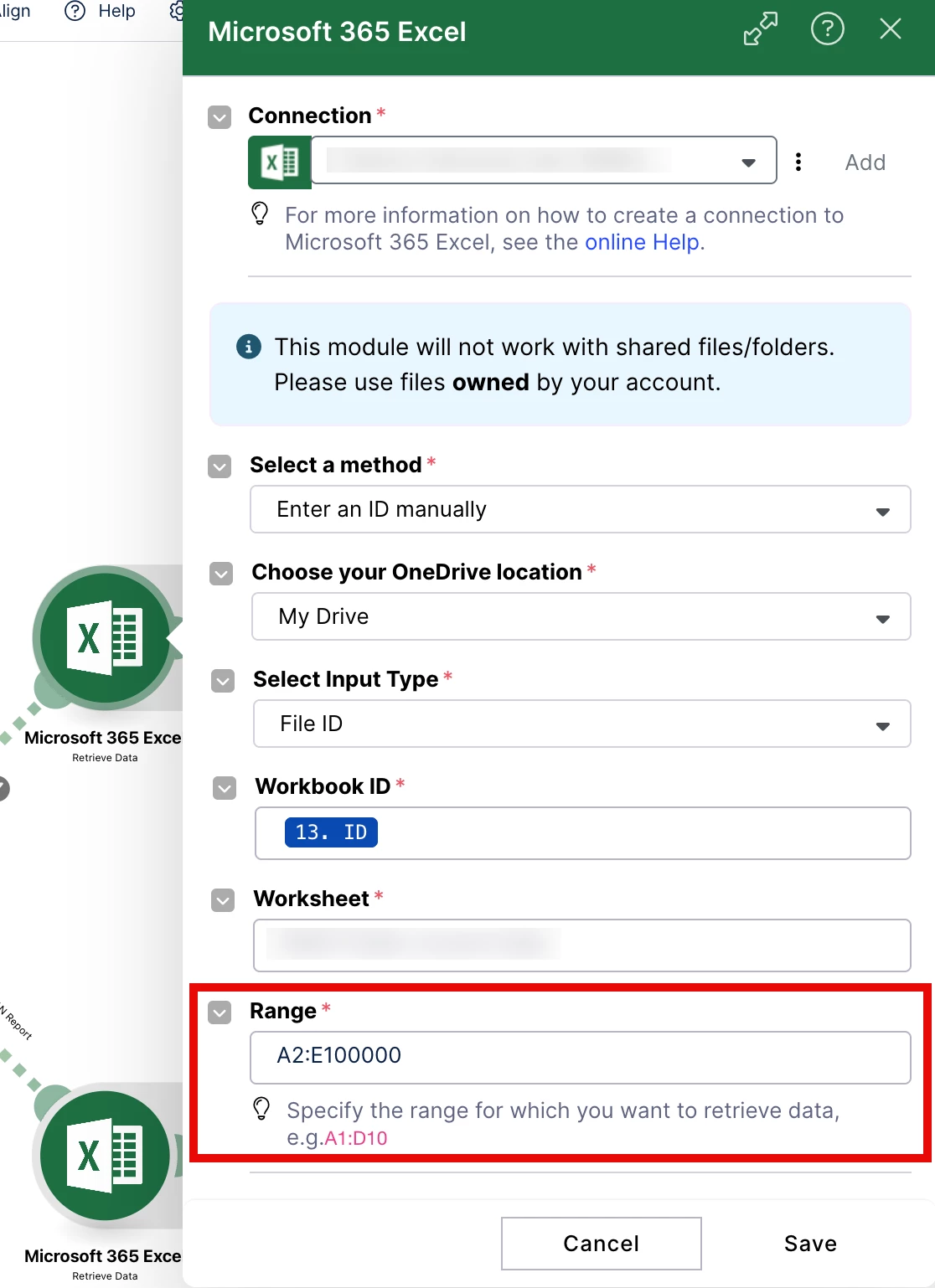
Also, I would recommend not keeping the retrieval range too large. Even if those rows don't contain any data, the Action Flow still has to process and check the entire specified range, which increases memory consumption.


ktrs
Level 2
  • Level 2
  • June 30, 2026

No, unfortunately we cannot touch the incoming Excel. That’s exactly why we are using Action Flows: to process an Excel we cannot modify and bring it to the form we need.
The retrieval range is so large, because we cannot know in advance how many rows it will contain. It’s a list that grows over time. That’s why I have to retrieve a big range, and then in the filter, I filter out the empty rows.

I still think that processing that many rows from an excel should be a trivial task by modern standards and shouldn’t cause any issues. I think this is a design flaw in Action Flows.