
guidemesolutions-startover-c4c.us-1.celonis.cloud

  • Dec 6, 2022 3:47 PM UTC
  • 3 replies
  • 129 views

Hi

Can anyone help me understand this error message please? I've used templates throughout
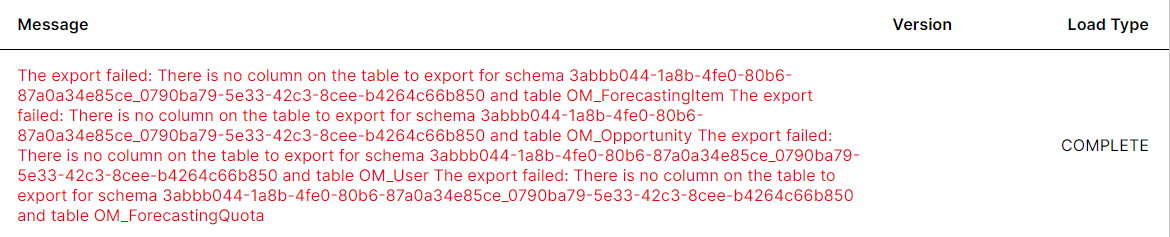
Error message


https://guidemesolutions-startover-c4c.us-1.celonis.cloud/

3 replies

  • Dec 6, 2022 7:53 PM UTC

So I worked out I needed to add more tables which I have but now the last Add View statement won't work and the data model won't run without it

The transformation statement (from the template - I haven't adjusted it) is this:

DROP table IF EXISTS OM_ForecastingQuota

;


CREATE Table OM_ForecastingQuota AS

SELECT DISTINCT

    F.QuotaAmount/"CT"."ConversionRate" AS QuotaAmount_Converted

    , cast(P.STARTDATE as date) AS PeriodStartDate

    , cast(P.ENDDATE as date) AS PeriodEndDate

    , P.FY_Name AS "FY_Name"

    , P.Q_Name AS "Q_Name"

    , F.*

FROM FORECASTINGQUOTA AS "F"

LEFT JOIN "OM_Period" AS P ON 1=1

    AND F.PERIODID = P.ID

JOIN "CurrencyType" AS CT ON 1=1

    AND F.CurrencyIsoCode = "CT".IsoCode

;


Insert into OM_ForecastingQuota (

    QuotaAmount_Converted

    , ForecastingTypeId

    , QuotaOwnerId

    , PeriodStartDate

    , PeriodEndDate

    , FY_Name

    , Q_Name

) SELECT DISTINCT

    0 as QuotaAmount_Converted

    , NULL as ForecastingTypeId

    , U.Id as QuotaOwnerId

    , cast(U.STARTDATE as Date) AS PeriodStartDate

    , cast(U.ENDDATE as Date) AS PeriodEndDate

    , U.FY_Name AS "FY_Name"

    , U.Q_Name AS "Q_Name"

from "ForecastingQuota" AS "F"

right join (

    select distinct

        "OM_User".Id

        , P.id as PeriodId

        , P.StartDate

        , P.EndDate

        , P.FY_Name

        , P.Q_Name

    from "OM_User"

    cross join OM_Period as P

    where 1=1

        and OM_USER.isActive = 1

        and P.FY_Name <= YEAR(ADD_MONTHS(CURRENT_DATE, 24))

        and P.FY_Name >= YEAR(ADD_MONTHS(CURRENT_DATE, -12))

        and P."Type" IN (

            select distinct

            PeriodTemp."type"

            from ForecastingQuota as QuotaTemp

            join "OM_Period" as PeriodTemp on 1=1

                and PeriodTemp.id = QuotaTemp.periodid

            )

) as U ON 1=1

    and F.QuotaOwnerId = U.Id

    and F.PeriodId = U.PeriodId

where 1=1

    and F.QuotaOwnerId is null

    and F.PeriodId is null

;


Error message I get on execution is:

Execution error: ERROR: Relation "FORECASTINGQUOTA" does not exist


  • Dec 6, 2022 9:14 PM UTC

Hello Lizzie,


in your case it means that needed table "FORECASTINGQUOTA" is missing in the backend (data ingestion SQL part).

There could be mutliple reasons for that, I would first investigate if that table should be located in your system, or it's artificially created in the transformations. If that's just missing, I would ask template developer/creator.


just FYI, sometimes also a problem comes from exporting / importing features between data pools. Try to export all the tables from "exporting" data pools and always sync. It's strange there's no auto-synch option (but probably it's possible to automate that by python).


Best Regards,

Mateusz Dudek


  • Dec 23, 2022 4:39 PM UTC

Hello Lizzie,


in your case it means that needed table "FORECASTINGQUOTA" is missing in the backend (data ingestion SQL part).

There could be mutliple reasons for that, I would first investigate if that table should be located in your system, or it's artificially created in the transformations. If that's just missing, I would ask template developer/creator.


just FYI, sometimes also a problem comes from exporting / importing features between data pools. Try to export all the tables from "exporting" data pools and always sync. It's strange there's no auto-synch option (but probably it's possible to automate that by python).


Best Regards,

Mateusz Dudek

Thanks Mateusz I had the table in my extraction it was the transformation that was failing. I tried updating the SQL without any success so in the end I removed the requirement for the table from the data model which allowed me to delete the failing transformation statement and then it worked just without that table.
