


Ready to connect with peers and industry leaders?
Follow this simple guide to sign in and get started.
[Step 1] The First Click
Simply click the “Login” button at the top right corner of the page to open the log-in page.
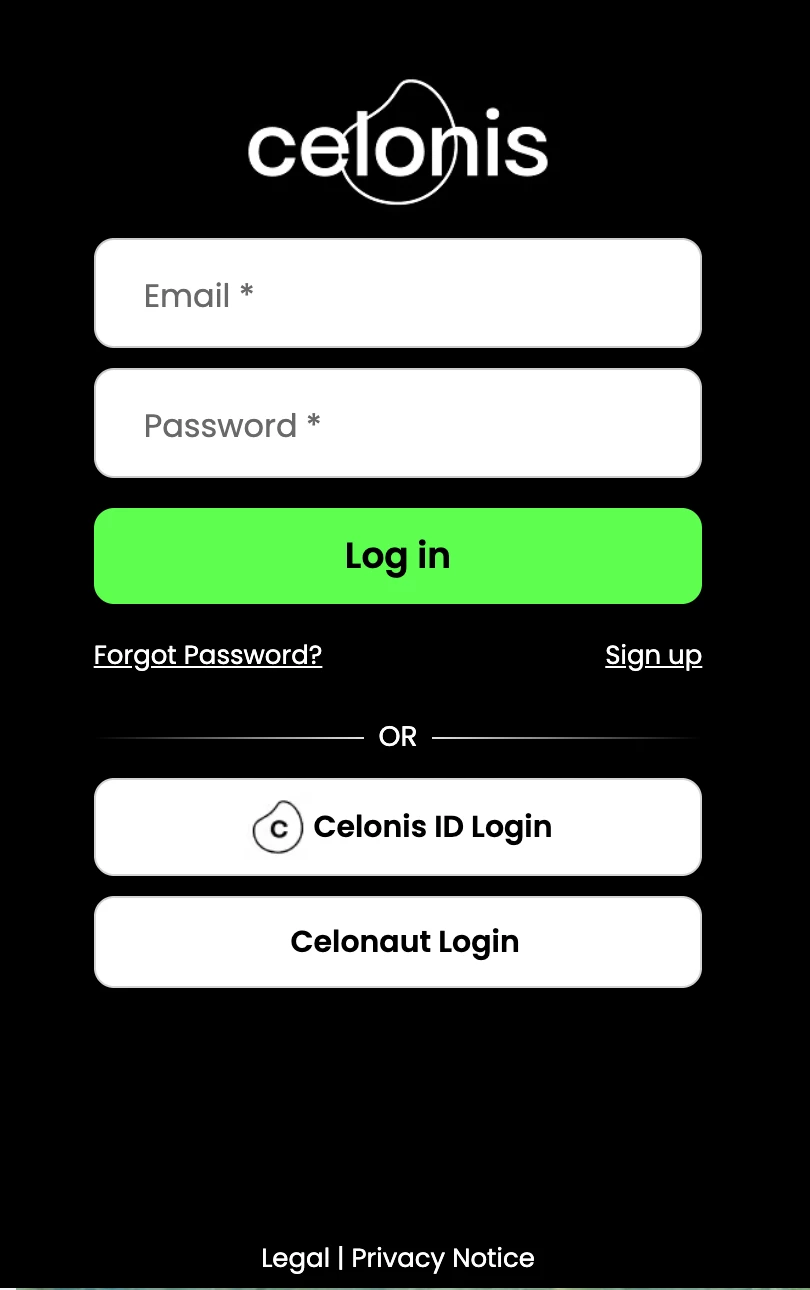
[Step 2] Choose Your Path
➡ Option A: Existing Celonis Users
If you have previously used our Academy, Support Center, or Partner Portal, you’re already set!
-
Enter your standard Celonis account email and password.
-
Click “Log in” to finish.
Pro Tip: We use Single Sign-On (SSO). This means one set of credentials works for all Celonis platforms (incl. Academy). If you update your password here, it updates everywhere else.
➡ Option B: New to Celonis?
If this is your first time visiting any of our platforms, welcome to the Celonis Community!
-
Click on the “Sign up” link located just below the "Log in" button.
-
Fill out the registration form.
-
Look for an activation email in your inbox.
-
Once activated, return to the login page & use your new credentials.
➡ Option C: Celonis Employees (Celonauts)
Use the "express lane" designed specifically for the Celonis employees:
Scroll to the bottom of the login screen and click the “Celonaut Login” button.
🙏 Need a Hand?
-
Password Reset: Click "Forgot your password?" on the login page for an instant reset.
-
Support: If you run into any login issues, create a Support Ticket.
-
Questions: Our team is here to help. Reach out to our team at community@celonis.com.