Question

Show Custom KPI by default in Variant/Process Explorer

  • February 3, 2020
  • 4 replies
  • 6 views

Forum|alt.badge.img+4
Hey there! Does anyone know of a way to display a custom KPI by default in the Variant or Process Explorers? Thanks, Karm

4 replies

  • Level 0
  • February 7, 2020
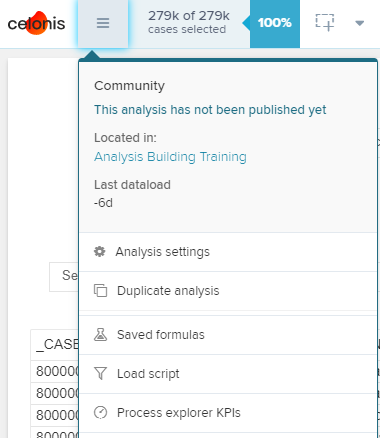
Hi @KarmSidhu, welcome to our community! Simply click on Process Explorer KPIs as shown on the attached screenshot. There you can define your Process Explorer KPIs. After saving it, it should be available in your process explorer. Hopefully that will solve your issue! If you need further support, please do not hesitate to contact us again! Best, Justin

Forum|alt.badge.img+4
Hey Justin, Thanks for your response. I was more thinking about the order in which those Process KPIs are displayed. It is a minor thing but say I wanted my own KPI to be loaded as the first thing when a Variant Explorer is shown or on the ordering of the dropdown. Thanks, Karm

  • Level 0
  • February 10, 2020
Hi Karm, unffortunately, you can not change the order of the standard KPIs. However, you can change the order of your individual KPIs by the of creation. Best, Justin

konrad.simon
Level 1
Forum|alt.badge.img+14
  • Level 1
  • November 24, 2022

Hi Justin, even though it is not possible to change the order of the KPIs, is it possible to determine which KPI is displayed as the Process/Variant Explorer is loaded? Thanks and best, Konrad