Question

Process Explorer indicates incorrect throughput time

  • July 10, 2023
  • 4 replies
  • 8 views

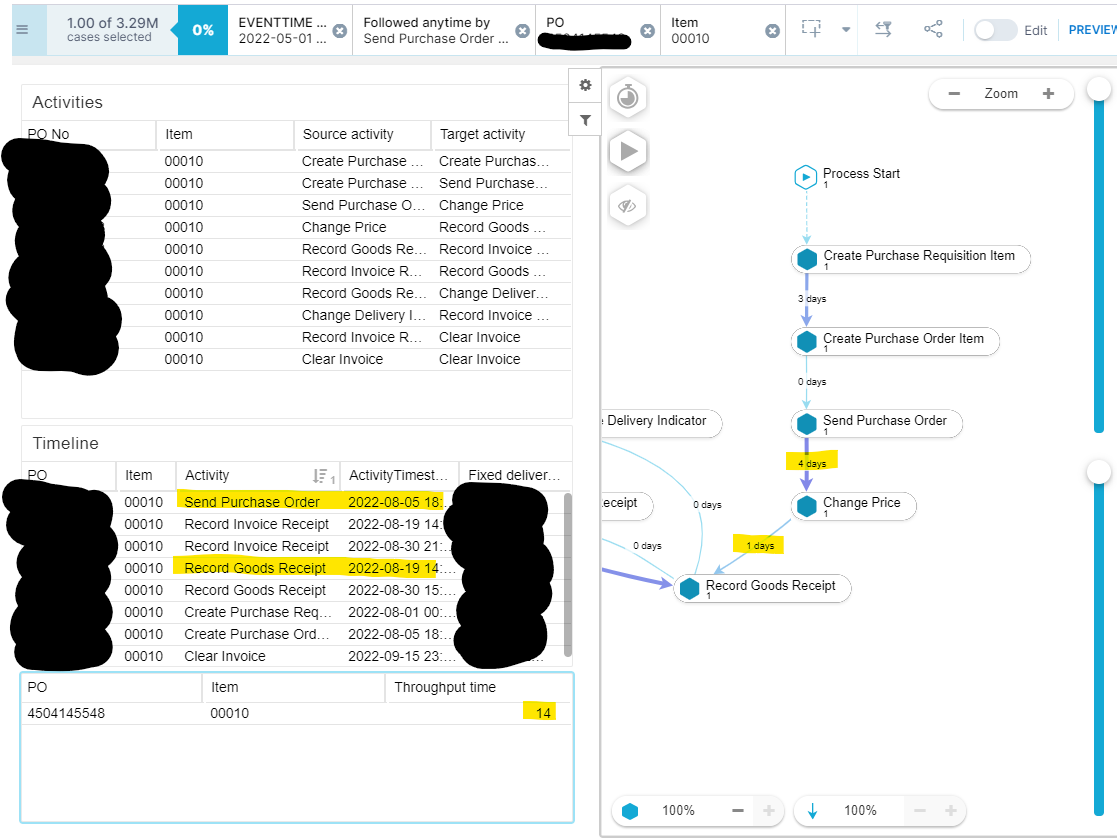
From the table it can be seen that the throughput time from first occurrence of "Send Purchase Order" to first occurrence of "Record Goods Receipt" is 14 days. This is confirmed by the calculation also.


Still the Process Explorer indicates 5 days for the same case. Any idea for the "error" in the Process Explorer (there are no component filter enabled in the process explorer)?Celonis screenshot example
4 replies

I had some similiar issue. But I couldn't figure out, what the problem was.


  • Author
  • Level 1
  • July 12, 2023

I had some similiar issue. But I couldn't figure out, what the problem was.

Thanks for reaching out @lennart.bruns12. For info I checked if remapping of calendar could be a source, but it was not.


biswajit.jena12
Level 5
Forum|alt.badge.img+10

Maybe Check the case explorer for that single case.

Normally i have seen adding activities in an OLAP gives weird results.


  • Author
  • Level 1
  • August 7, 2023

Maybe Check the case explorer for that single case.

Normally i have seen adding activities in an OLAP gives weird results.

Thank you for the tip of checking the case explorer @biswajit.jena12. It actually confirms that the data in the OLAP table is correct. Hence it confirms that the numbers presented in the Process Explorer are incorrect. And this does not only apply to the specific case, but multiple cases......