
Question

Is it possible to open link to view with filter in link parameter?

  • July 17, 2025
  • 3 replies
  • 256 views

fabian.altendorfer
Level 3
Forum|alt.badge.img

Hi,


I would like to link from a dashboard to a View with Process Explorer. In the dashboard, an object is selected and I would like to give the object identifier with the link to celonis, so that I can filter in the process explorer based on that (so that I only see this individual object and it’s event log).

Is this possible to achieve with a Celonis View?
Many Thanks,

3 replies

julia.bauer
Level 9
Forum|alt.badge.img+7
  • Level 9
  • July 21, 2025

Hi ​@fabian.altendorfer , 


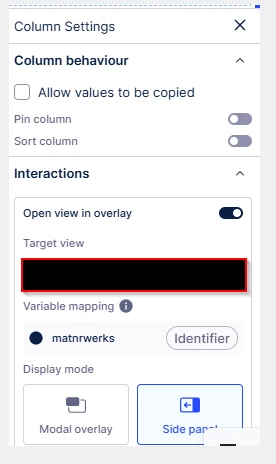
yes this is possible. You would need to create an object identifier in your dashboard (e.g. MATNR || WERKS) and then within the column settings adjust the interactions panel (open view in overlay, name your target view (that’s the view with the process explorer) and select a variable to map). The mapped variable is the view variable from your overlay view (process explorer view). After having done this, jump in your process explorer view and create a filter: 

FILTER

("MARC"."MATNR" || "MARC"."WERKS") = '${matnrwerks}' → meaning in this exemplary case the profile view will be filtered by the field combination MATNR || WERKS.


Hope this makes sense.


BR

Julia Bauer


sarvesh143
Level 1
  • Level 1
  • July 7, 2026

Hi ​@julia.bauer 


thanks for answering this , but can you please elaborate this , I am working on exact same use case , where I need to open the view with variable filter link , what is object identifier? and how to create it ?


Kamil Deren
Level 3
Forum|alt.badge.img+1

Hi ​@sarvesh143 ,


Object identifier is a combination of table columns, in Julia’s example its Material + Plant. So whenever she presses on that combination in the table (it will be underlined and in blue) it will open side view which is filtered by this exact identifier (ex. pressing on MaterialPlant = 123Europe will open the side view with only rows that match Material = 123 and Plant = Europe).

Just dont forget to set the filter on the target view 

FILTER

("MARC"."MATNR" || "MARC"."WERKS") = '${matnrwerks}' → meaning in this exemplary case the profile view will be filtered by the field combination MATNR || WERKS.


Depending on your case, the identifier will differ (for opening Vendor related side view it would be for example LFA1.LIFNR)


Hope that helps!