Question

Hello, I need an help for my first Project in Celonis Studio. I would like to add a fixed value Variable to my Process Analysis. In detail, I would like to add to the Variant Explorer View a customized KPI like a fixed work cost per hour.

  • April 21, 2023
  • 22 replies
  • 19 views

The result I want to obtain is the same we have by default for the hours/case frequency directly on the Process, but from a cost perspective. Is that possible?


Thank you,


Giulia

22 replies

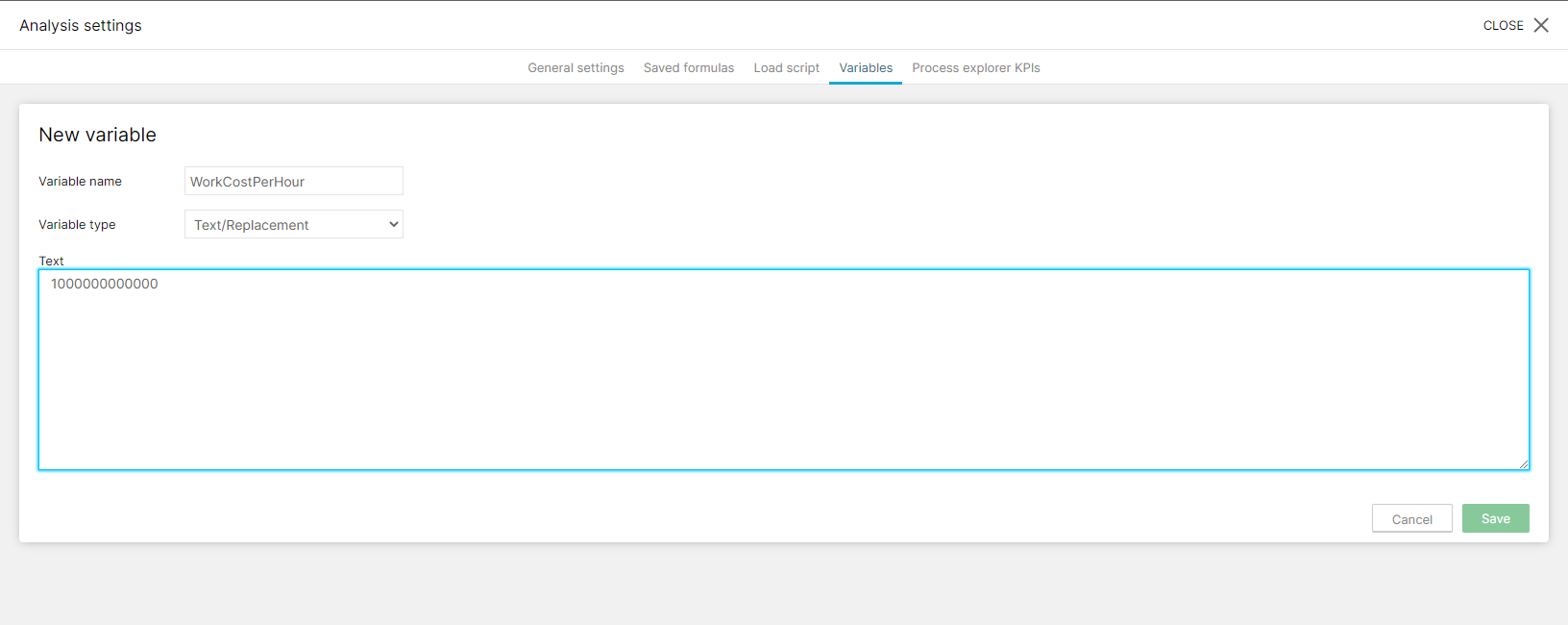
Hmmm.... you can always set the initial value of a variable when defining it

imageand it will keep that value as long as you don't set the variable from other places (like a button dropdown)
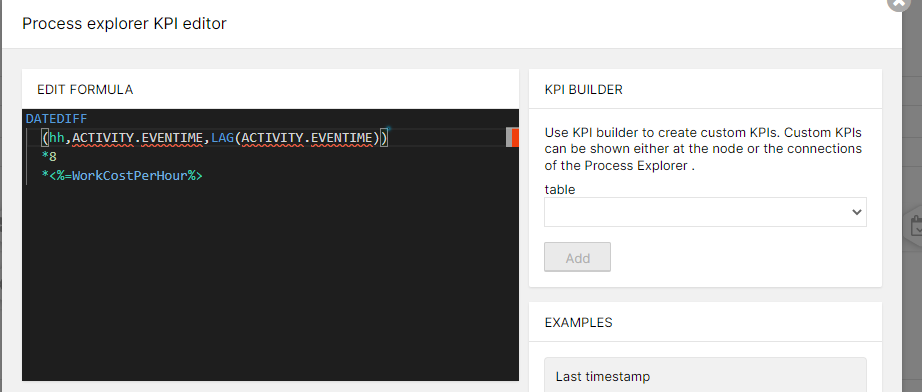
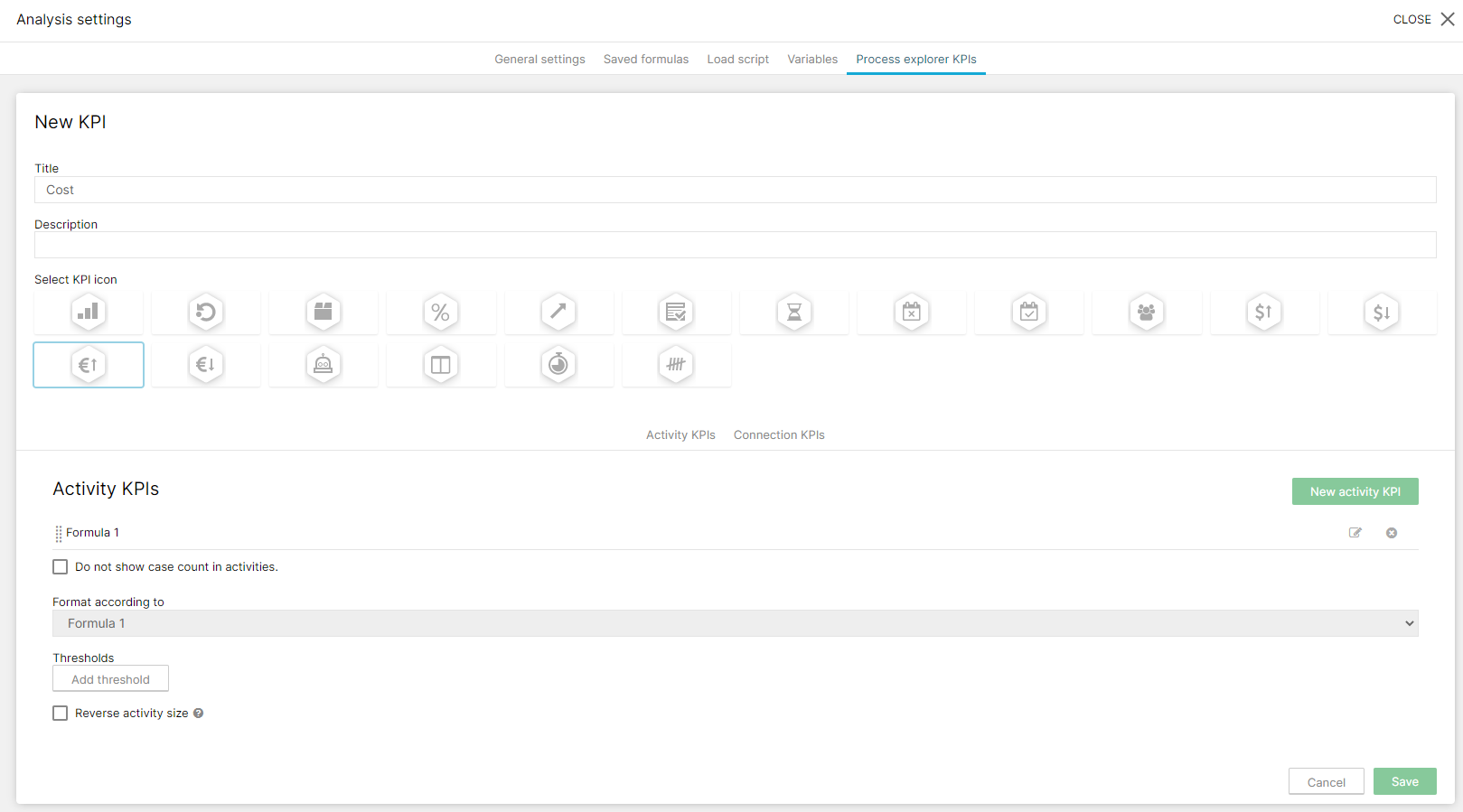
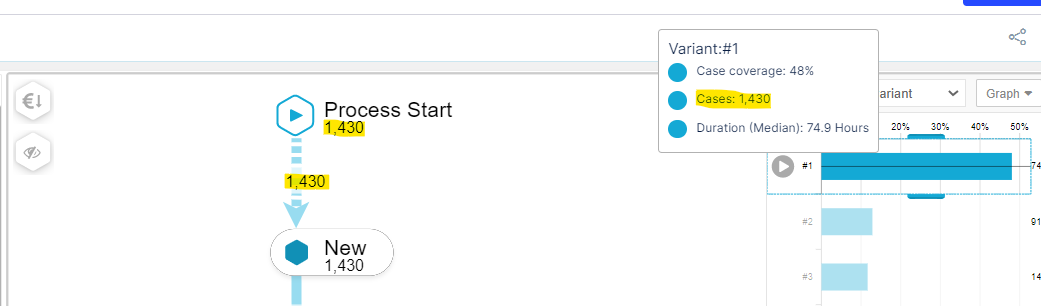
 

You can use that to create the KPI, something like


image 

image 

HTH


  • Author
  • Level 5
  • April 26, 2023

Hello Guillermo,


Thank you for your reply. I've tried as you suggested, but I can see from my Variable Explorer the same values if I select the default KPI "Case Frequency" and the new one I've already created for the costs:

imageso that 1.430 is the value of the Case Frequency but also it seems to be the value of my new KPI.
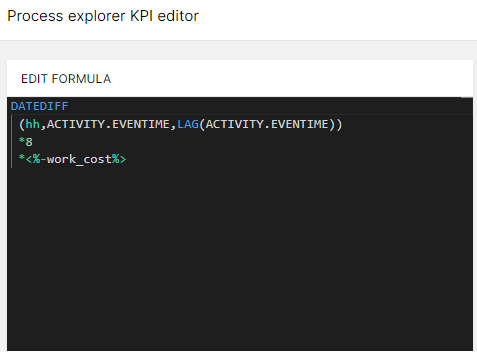
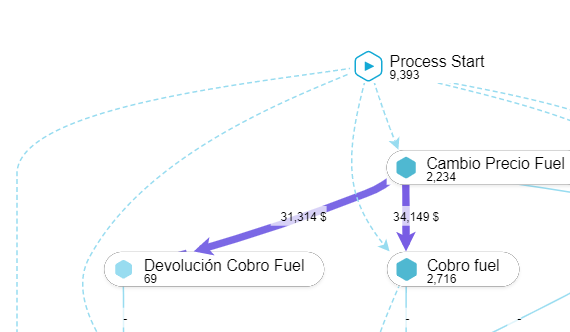
Is there something I'm missing?


Thank you in advance,


Giulia


Hello Guillermo,


Thank you for your reply. I've tried as you suggested, but I can see from my Variable Explorer the same values if I select the default KPI "Case Frequency" and the new one I've already created for the costs:

imageso that 1.430 is the value of the Case Frequency but also it seems to be the value of my new KPI.
Is there something I'm missing?


Thank you in advance,


Giulia

Can you share the PQL of your KPI?


  • Author
  • Level 5
  • April 26, 2023

Hi Guillermo,

I've just copied the one you have shared:

image 

Thanks,


Giulia


Try to put a SUM, MEDIAN or AVG before

like


AVG(

datediff(......

)


Let me know the result


  • Author
  • Level 5
  • April 26, 2023

Hi Guillermo,


I confirm the values remains the same regardless of the adding to the PQL.

I've also tried with different data pool and I obtained the same result, so I do not think it may depends on the data.


Thanks,


Giulia


Hi Guillermo,


I confirm the values remains the same regardless of the adding to the PQL.

I've also tried with different data pool and I obtained the same result, so I do not think it may depends on the data.


Thanks,


Giulia


Hmmm... ok, no promises, but I will try to replicate that in some of my environments.


Again, no promises, I am kind of swamped....


Hi Guillermo,


I confirm the values remains the same regardless of the adding to the PQL.

I've also tried with different data pool and I obtained the same result, so I do not think it may depends on the data.


Thanks,


Giulia


Got it!


Sorry for the delay, as I said, a bit swamped plus a lot of holidays here....


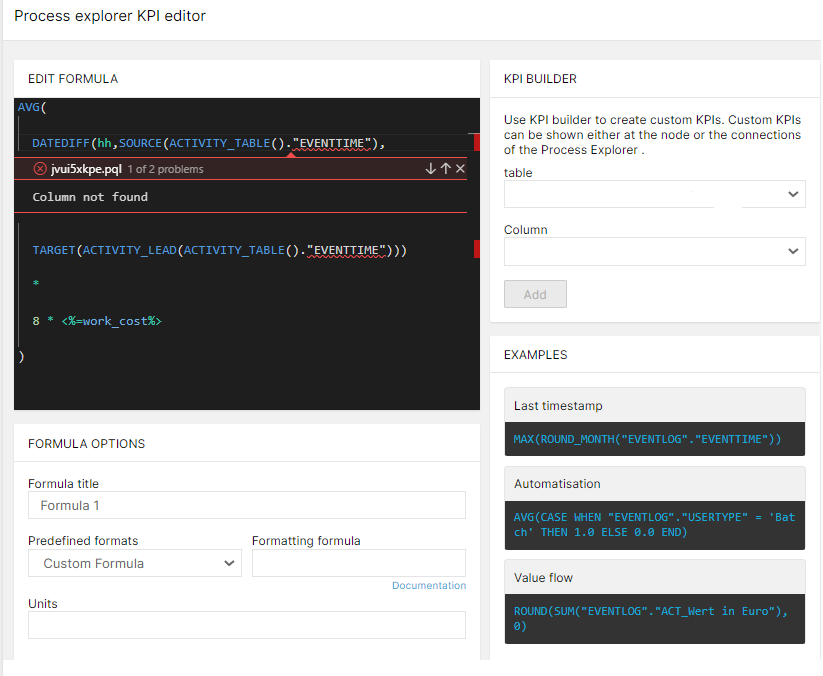
The trick is that for Process Explorer KPI you need Source and Target.


This works:


AVG(

  DATEDIFF(hh,SOURCE(ACTIVITY_TABLE()."EVENTTIME"),

  TARGET(ACTIVITY_LEAD(ACTIVITY_TABLE()."EVENTTIME")))

  *

  8 * <%=work_cost%>

)


image 

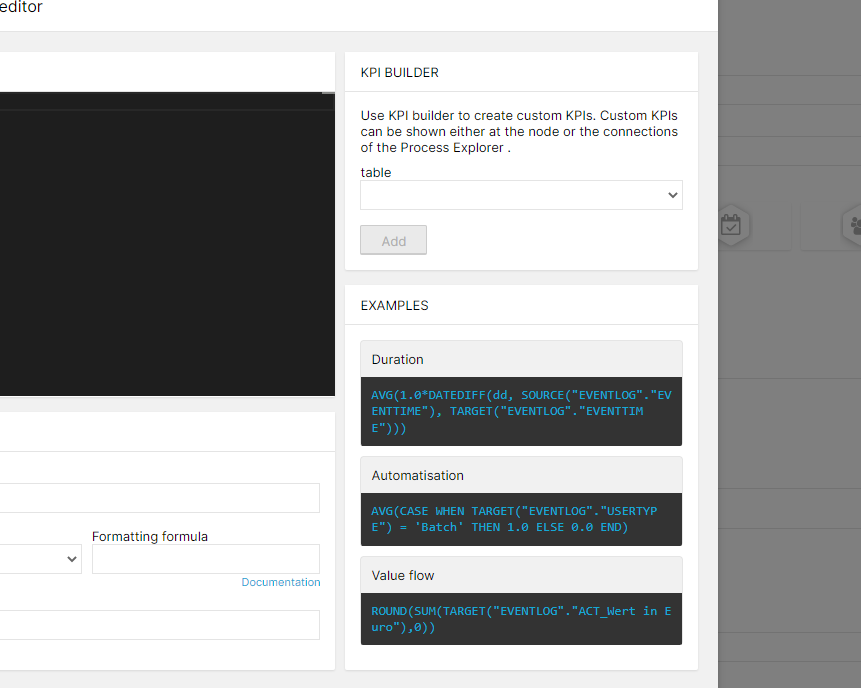
It is NOT very clear in docs.celonis.com, but when creating the KPI you have some examples:


image 

HTH


  • Author
  • Level 5
  • May 4, 2023

Got it!


Sorry for the delay, as I said, a bit swamped plus a lot of holidays here....


The trick is that for Process Explorer KPI you need Source and Target.


This works:


AVG(

  DATEDIFF(hh,SOURCE(ACTIVITY_TABLE()."EVENTTIME"),

  TARGET(ACTIVITY_LEAD(ACTIVITY_TABLE()."EVENTTIME")))

  *

  8 * <%=work_cost%>

)


image 

It is NOT very clear in docs.celonis.com, but when creating the KPI you have some examples:


image 

HTH

Hello Guillermo,


Thank you really much for the help.

I've tried again with the new script but I receive the following error message:

image 

Am I missing something?


Thank you in advance,


Giulia


Got it!


Sorry for the delay, as I said, a bit swamped plus a lot of holidays here....


The trick is that for Process Explorer KPI you need Source and Target.


This works:


AVG(

  DATEDIFF(hh,SOURCE(ACTIVITY_TABLE()."EVENTTIME"),

  TARGET(ACTIVITY_LEAD(ACTIVITY_TABLE()."EVENTTIME")))

  *

  8 * <%=work_cost%>

)


image 

It is NOT very clear in docs.celonis.com, but when creating the KPI you have some examples:


image 

HTH

Check the columns names in your activity table. Usually the standard column name in Activity Table for the timestamp of the activity is EVENTTIME, but it seems in your Process Model that column doesn't exists.


  • Author
  • Level 5
  • May 4, 2023

Got it!


Sorry for the delay, as I said, a bit swamped plus a lot of holidays here....


The trick is that for Process Explorer KPI you need Source and Target.


This works:


AVG(

  DATEDIFF(hh,SOURCE(ACTIVITY_TABLE()."EVENTTIME"),

  TARGET(ACTIVITY_LEAD(ACTIVITY_TABLE()."EVENTTIME")))

  *

  8 * <%=work_cost%>

)


image 

It is NOT very clear in docs.celonis.com, but when creating the KPI you have some examples:


image 

HTH

Hi Guillermo,


I tried by entering the exact name of the Data Pool column where I have the timestamp value. Now the error message has disappeared but I cannot apply the KPI anyway:

image.png 

Do you have something else in mind?


Thank you in advance,


Giulia


Got it!


Sorry for the delay, as I said, a bit swamped plus a lot of holidays here....


The trick is that for Process Explorer KPI you need Source and Target.


This works:


AVG(

  DATEDIFF(hh,SOURCE(ACTIVITY_TABLE()."EVENTTIME"),

  TARGET(ACTIVITY_LEAD(ACTIVITY_TABLE()."EVENTTIME")))

  *

  8 * <%=work_cost%>

)


image 

It is NOT very clear in docs.celonis.com, but when creating the KPI you have some examples:


image 

HTH

You have created it as a Activity KPI, you need to define ir as a Connection KPI.

Also, just in case, remove the Activity KPI with SOURCE and TARGET


  • Author
  • Level 5
  • May 5, 2023

Thanks Guillermo, it works now!!!

So what I'm seeing now should be the average cost of passing from an activity to another, calculated by:

fixed cost value per hour x throughput time (AVG) in terms of hours, right?


Thank you again!


Giulia


  • Author
  • Level 5
  • May 5, 2023

Got it!


Sorry for the delay, as I said, a bit swamped plus a lot of holidays here....


The trick is that for Process Explorer KPI you need Source and Target.


This works:


AVG(

  DATEDIFF(hh,SOURCE(ACTIVITY_TABLE()."EVENTTIME"),

  TARGET(ACTIVITY_LEAD(ACTIVITY_TABLE()."EVENTTIME")))

  *

  8 * <%=work_cost%>

)


image 

It is NOT very clear in docs.celonis.com, but when creating the KPI you have some examples:


image 

HTH

Hi Guillermo,


It is working now! Thank you really much!

So, can you just explain me a little bit better how the value I now see is calculated based on my data?

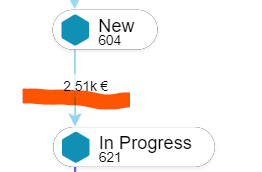
Assuming my fixed cost per hour is 30 with a throughput time (AVG) per hour between these two Activities of 2 hours, how do I get the below number?

image 


Thank you in advance,


Giulia


Got it!


Sorry for the delay, as I said, a bit swamped plus a lot of holidays here....


The trick is that for Process Explorer KPI you need Source and Target.


This works:


AVG(

  DATEDIFF(hh,SOURCE(ACTIVITY_TABLE()."EVENTTIME"),

  TARGET(ACTIVITY_LEAD(ACTIVITY_TABLE()."EVENTTIME")))

  *

  8 * <%=work_cost%>

)


image 

It is NOT very clear in docs.celonis.com, but when creating the KPI you have some examples:


image 

HTH

Yep, my bad. I messed up TARGET and ACTIVITY_LEAD and my test data happend to have few connections with duration.


The thing is that the correct KPI will be like:

AVG(<%=work_cost%> *DATEDIFF(hh,SOURCE(ACTIVITY_TABLE()."EVENTTIME"),TARGET(ACTIVITY_TABLE()."EVENTTIME")))


That should work


Notice that now I have removed the "ACTIVITY_LEAD()" function inside the TARGET

I guess when you had the ACTIVITY_LEAD actually gets the timestamp of the NEXT activity (i.e. the second activity after the SOURCE)... the thing is my test data didn't have duration between the next activities so I didn't noticed the problem.


Hope this time I really got it ... :D


BTW a pleasure to help


  • Author
  • Level 5
  • May 8, 2023

Got it!


Sorry for the delay, as I said, a bit swamped plus a lot of holidays here....


The trick is that for Process Explorer KPI you need Source and Target.


This works:


AVG(

  DATEDIFF(hh,SOURCE(ACTIVITY_TABLE()."EVENTTIME"),

  TARGET(ACTIVITY_LEAD(ACTIVITY_TABLE()."EVENTTIME")))

  *

  8 * <%=work_cost%>

)


image 

It is NOT very clear in docs.celonis.com, but when creating the KPI you have some examples:


image 

HTH

Hi Guillermo,


I confirm now it is perfect!

Thank you again really much for the help :)


Giulia


Got it!


Sorry for the delay, as I said, a bit swamped plus a lot of holidays here....


The trick is that for Process Explorer KPI you need Source and Target.


This works:


AVG(

  DATEDIFF(hh,SOURCE(ACTIVITY_TABLE()."EVENTTIME"),

  TARGET(ACTIVITY_LEAD(ACTIVITY_TABLE()."EVENTTIME")))

  *

  8 * <%=work_cost%>

)


image 

It is NOT very clear in docs.celonis.com, but when creating the KPI you have some examples:


image 

HTH

My pleasure, Giulia, my pleasure.... :)


  • Author
  • Level 5
  • May 29, 2023

Got it!


Sorry for the delay, as I said, a bit swamped plus a lot of holidays here....


The trick is that for Process Explorer KPI you need Source and Target.


This works:


AVG(

  DATEDIFF(hh,SOURCE(ACTIVITY_TABLE()."EVENTTIME"),

  TARGET(ACTIVITY_LEAD(ACTIVITY_TABLE()."EVENTTIME")))

  *

  8 * <%=work_cost%>

)


image 

It is NOT very clear in docs.celonis.com, but when creating the KPI you have some examples:


image 

HTH

Hello Guillermo,


Sorry to come back again to you!

I have another question: assuming I would like to add a specific weekday calendar to your script, how should I add it?

The calendar I would like to specificy is to include only Monday to Friday workdays to the throughput time calculation!


Thank you in advance,


Giulia


Got it!


Sorry for the delay, as I said, a bit swamped plus a lot of holidays here....


The trick is that for Process Explorer KPI you need Source and Target.


This works:


AVG(

  DATEDIFF(hh,SOURCE(ACTIVITY_TABLE()."EVENTTIME"),

  TARGET(ACTIVITY_LEAD(ACTIVITY_TABLE()."EVENTTIME")))

  *

  8 * <%=work_cost%>

)


image 

It is NOT very clear in docs.celonis.com, but when creating the KPI you have some examples:


image 

HTH

DATEDIFF doesn't support calendars.


You need to substitute the DATEDIFF by WORKDAY_BETWEEN ( or MONTHS_BETWEEN, HOURS_BETWEEN, etc...)


https://docs.celonis.com/en/workdays_between.html


Then you need to add a calendar as parameter.

For your case this example should give you enough clues:


WORKDAYS_BETWEEN ( "TimestampTable"."Begin" , "TimestampTable"."End" , WEEKDAY_CALENDAR ( MONDAY 09:00 - 17:00 TUESDAY 09:00 - 17:00 THURSDAY 09:00 - 17:00 FRIDAY 09:00 - 17:00 SATURDAY 09:00 - 17:00 ) )


P.S. AFAIK all is UTC, no idea how to apply timezones and summer/winter changes.


HTH


  • Author
  • Level 5
  • May 29, 2023

Got it!


Sorry for the delay, as I said, a bit swamped plus a lot of holidays here....


The trick is that for Process Explorer KPI you need Source and Target.


This works:


AVG(

  DATEDIFF(hh,SOURCE(ACTIVITY_TABLE()."EVENTTIME"),

  TARGET(ACTIVITY_LEAD(ACTIVITY_TABLE()."EVENTTIME")))

  *

  8 * <%=work_cost%>

)


image 

It is NOT very clear in docs.celonis.com, but when creating the KPI you have some examples:


image 

HTH

Thank you for your really quick reply Guillermo!

All clear, just a question: what values should I put under "TimestampTable"."Begin" , "TimestampTable"."End"?

Is "TimestampTable" the name of my data sheet?


Thank you in advance,


Giulia


Got it!


Sorry for the delay, as I said, a bit swamped plus a lot of holidays here....


The trick is that for Process Explorer KPI you need Source and Target.


This works:


AVG(

  DATEDIFF(hh,SOURCE(ACTIVITY_TABLE()."EVENTTIME"),

  TARGET(ACTIVITY_LEAD(ACTIVITY_TABLE()."EVENTTIME")))

  *

  8 * <%=work_cost%>

)


image 

It is NOT very clear in docs.celonis.com, but when creating the KPI you have some examples:


image 

HTH


WORKDAY_BETWEEN(

SOURCE(ACTIVITY_TABLE()."EVENTTIME"),

TARGET(ACTIVITY_TABLE()."EVENTTIME"),

WEEKDAY_CALENDAR ( MONDAY 09:00 - 17:00 TUESDAY 09:00 - 17:00 THURSDAY 09:00 - 17:00 FRIDAY 09:00 - 17:00 SATURDAY 09:00 - 17:00 )

)


  • Author
  • Level 5
  • May 29, 2023

Got it!


Sorry for the delay, as I said, a bit swamped plus a lot of holidays here....


The trick is that for Process Explorer KPI you need Source and Target.


This works:


AVG(

  DATEDIFF(hh,SOURCE(ACTIVITY_TABLE()."EVENTTIME"),

  TARGET(ACTIVITY_LEAD(ACTIVITY_TABLE()."EVENTTIME")))

  *

  8 * <%=work_cost%>

)


image 

It is NOT very clear in docs.celonis.com, but when creating the KPI you have some examples:


image 

HTH

All works now!

Thank you again, you are top!


Giulia