
 I have tried additional filters like:
FILTER ACTIVITY_TABLE.COLUMN !=;
FILTER ACTIVITY_TABLE.COLUMN != ;
FILTER ACTIVITY_TABLE.COLUMN !=-;
Best regards,
Paul Velthuis
I have tried additional filters like:
FILTER ACTIVITY_TABLE.COLUMN !=;
FILTER ACTIVITY_TABLE.COLUMN != ;
FILTER ACTIVITY_TABLE.COLUMN !=-;
Best regards,
Paul Velthuis
Question
Filter null values (-) from a dropdown in IBC
Hello Celonis and Celonis Users,
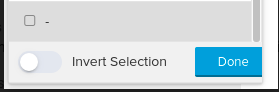
There is a dropdown we like to create without showing the null values, The dropdown is based on the activity column, so some activities have null values in them.
If I filter with: FILTER ACTIVITY_TABLE.COLUMN IS NOT NULL;
I see the null value drop to the bottom:
I have tried additional filters like:
FILTER ACTIVITY_TABLE.COLUMN !=;
FILTER ACTIVITY_TABLE.COLUMN != ;
FILTER ACTIVITY_TABLE.COLUMN !=-;
Best regards,
Paul Velthuis
I have tried additional filters like:
FILTER ACTIVITY_TABLE.COLUMN !=;
FILTER ACTIVITY_TABLE.COLUMN != ;
FILTER ACTIVITY_TABLE.COLUMN !=-;
Best regards,
Paul Velthuis

Enter your E-mail address. We'll send you an e-mail with instructions to reset your password.