Question

Explore table by different dimensions in Views

  • July 27, 2023
  • 9 replies
  • 17 views

Hi! Does anybody know how to recreate a ‘drill down table by different dimensions’ component that can be easily done in the Analysis but seems to be more complicated in the Views. I tried different ways but I am missing some piece to make it works.


Thanks!

9 replies

mallik.koruk11
Level 6
Forum|alt.badge.img+8

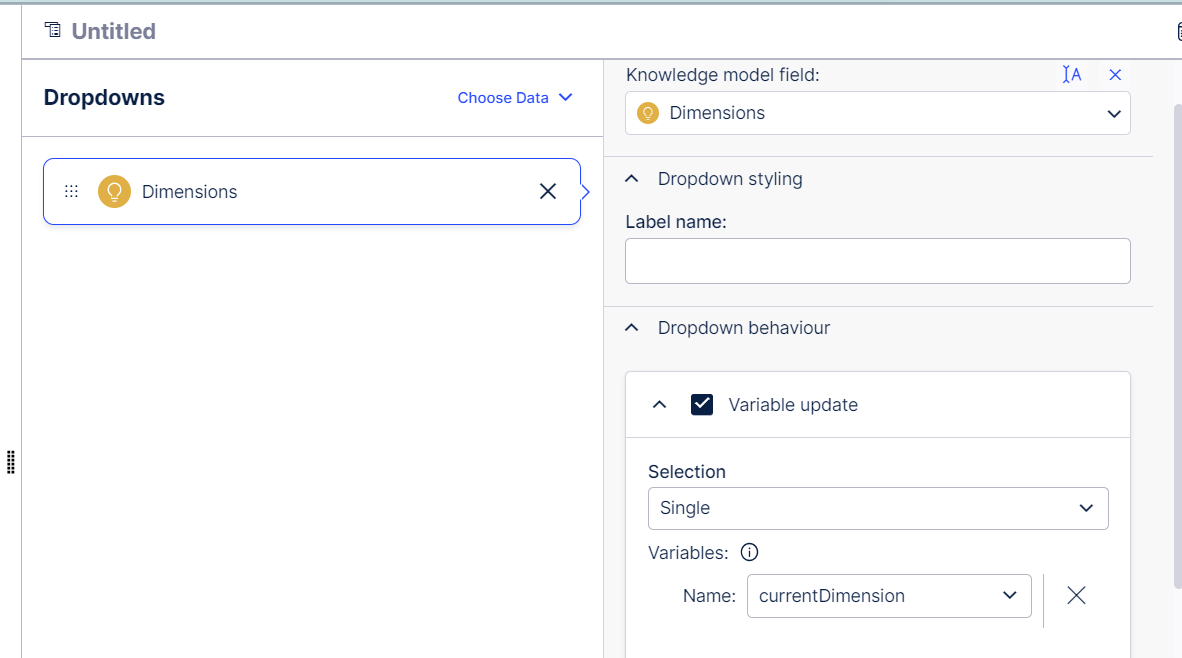
Yeah, it's a bit complicated in views configuration, you have to create as a custom dimension and refer it using variables. custom dimensions are currently not supporting visual interface in Knowledge model (hopefully will be available soon). So, one should have basic knowledge on YAML and using YAML script you can configure dimensions.

image 

Thank you :)


  • Author
  • Level 2
  • July 28, 2023

Thanks a lot @mallik.koruk11  I added the custom object accordingly and then created the currentdimension var from Dropdown component and then added it with YAML editor as a column to the table but…now the table doesn’t want to read the variable showing an error that column is not configured even though the var is not showing an error. Any idea? :)


Thanks!


kailash.potha12
Level 10
Forum|alt.badge.img+6

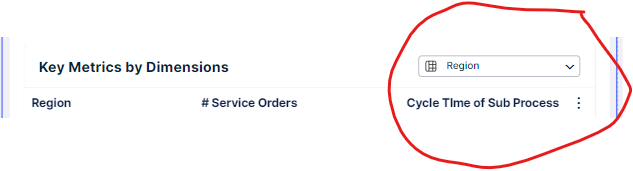
Hi @anna.tomcz - BreakdownSelector is another option

imageimage


  • Author
  • Level 2
  • July 31, 2023

@kailash.potha12 thanks a lot ! :) Now, it's working!


Thanks,

Anna


Forum|alt.badge.img+14

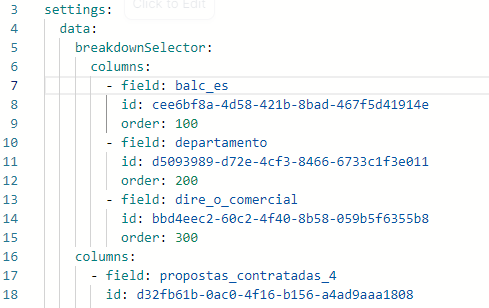
@kailash.potha12 Hi! Jumping in, because I'm trying to use the BreakdownSelector, but the column where the dimension should be returns an error message ''column not configured''. Any idea why?


  • Author
  • Level 2
  • September 6, 2023

@kailash.potha12 Hi! Jumping in, because I'm trying to use the BreakdownSelector, but the column where the dimension should be returns an error message ''column not configured''. Any idea why?

@ricardo.ribei11 I got this error in the beginning when I was trying to configure BreakdownSelector for the first time. I added the name of the column but forgot to add the reference to the record before that name.


Forum|alt.badge.img+14

@ricardo.ribei11 I got this error in the beginning when I was trying to configure BreakdownSelector for the first time. I added the name of the column but forgot to add the reference to the record before that name.

Hi @anna.tomcz ! Thank you so much. Nonetheless, how do you add such reference?


I leave a pic below. I wish to analyze 3 dimensions: balc_es, departamento and dire_o_comercial. These are all attributes. Where should I fit the record you mention?


image


Forum|alt.badge.img+14

@ricardo.ribei11 I got this error in the beginning when I was trying to configure BreakdownSelector for the first time. I added the name of the column but forgot to add the reference to the record before that name.

Actually just managed to do it as well. Thanks all the same!


  • Author
  • Level 2
  • September 6, 2023

@ricardo.ribei11 I got this error in the beginning when I was trying to configure BreakdownSelector for the first time. I added the name of the column but forgot to add the reference to the record before that name.

No problem! :)