Question

How to use dynamic column names (Current Date - YYYY/MM) ?

  • July 5, 2023
  • 9 replies
  • 101 views

Hey Celopeers,


I want to create a Table within a View wihich contains 4 columns. One Column is the Dimension Column (Gives 15 Rows).

In one column the numer of invoices for the current month are counted. In the other column the number of invoices from the previous month and in the last column the number of invoices for the month before last.


The user want to have the coulmn names in the format "YYYY/MM" and the column names should be dynamic, so that in the new month the column names are updated automatically.


We are using the Knowledge Model - View Technology and no analysis.


I also thought of using a chart diagramm, but the users require a table.


I tried some things, but nothing worked.


So if somebody knows about how to create dynamic columns I would be very thankful for your help :D



9 replies

I think it is just PQL


TO_STRING(ADD_MONTHS(TODAY(),-1), FORMAT ('%Y-%m')) for the dimension label


or something like that


check

https://docs.celonis.com/en/to_string.html

https://docs.celonis.com/en/add_months.html


and for the KPI do a COUNT(DISTINCT CASE WHEN ROUND_MONTH(dateevent) = ROUNDMONTH(ADD_MONTHS(TODAY(),-1)) THEN CASE_KEY

ELSE NULL

END)


HTH


Hi Guillermo,


thank you for your answer.

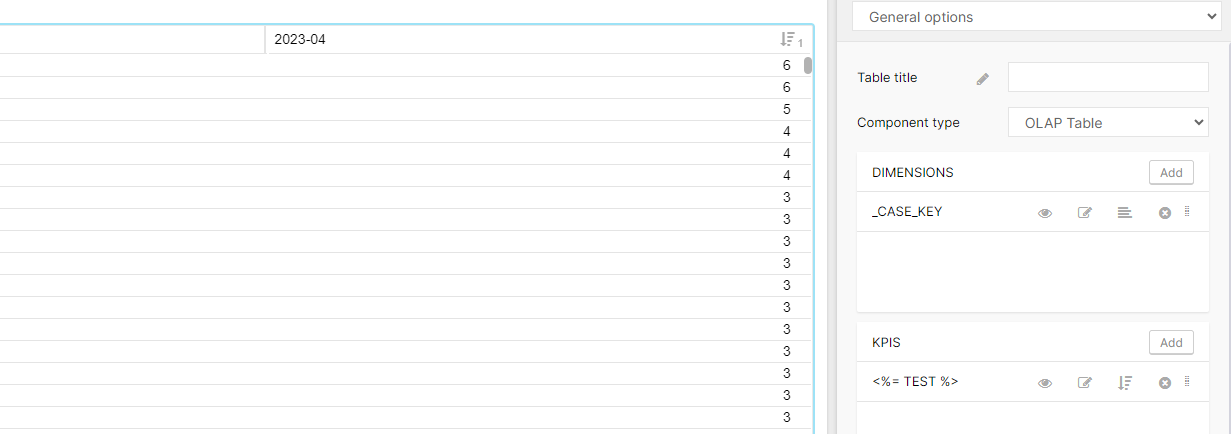
This kind of logic I've already tried. But when I enter this Code as my column Name it is just saved as string. So that means that the code will be printed, but not the result (The resulting month).


I think some characters and brackets are required, like when using a variable (<%= ... %>). But I don't know which one.


Hi Guillermo,


thank you for your answer.

This kind of logic I've already tried. But when I enter this Code as my column Name it is just saved as string. So that means that the code will be printed, but not the result (The resulting month).


I think some characters and brackets are required, like when using a variable (<%= ... %>). But I don't know which one.

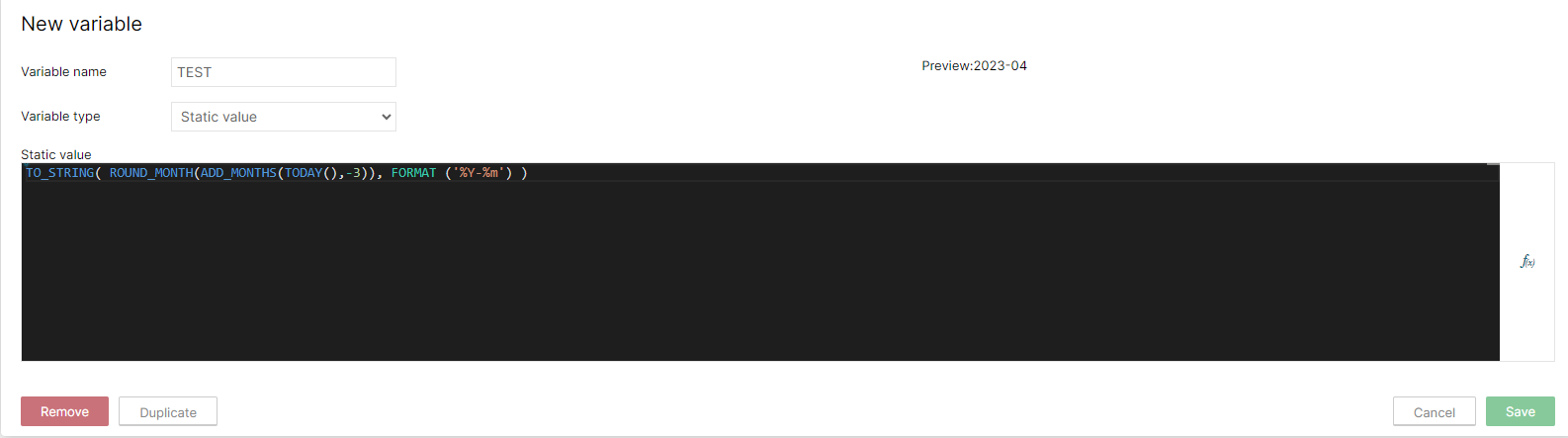
Create a Variable type Static


image 

put it in the label of the KPI


image 

HTH


Thank you very much, this is really good to know! :)


But does it also work for Knowledge Models and Views. So when I want to use a KPI within a Table?


Thank you very much, this is really good to know! :)


But does it also work for Knowledge Models and Views. So when I want to use a KPI within a Table?


In theory the KM variables can be used in Views, like analysis variables in analysis... but not an expert there...


kailash.potha12
Level 10
Forum|alt.badge.img+7

Thank you very much, this is really good to know! :)


But does it also work for Knowledge Models and Views. So when I want to use a KPI within a Table?


I tried different options ( View variable/KM Variable/ Global Varible) in views but no luck, please update here if you found something :)


Hi, I've also tried several things, but nothing worked. But when I find something, I will send it to you :)


jan.vajse12
Level 5
Forum|alt.badge.img+1
  • Level 5
  • October 24, 2023

Hello Celopeers colleagues,

I am working on a tracking table use case for which I require exactly the same - having dynamic column names for month-1, month-2, etc.

The View variable option does not work...as you already mentioned above.

Did you maybe find some good workaround in the meantime?


Thank you for any ideas!

Regards

Jan


David Toro
Celonaut
Forum|alt.badge.img
  • Celonaut
  • January 16, 2026

Hi dear all!


Coming a little late to the party 😁, but for future readers, In Views there’s is a workaround for this problem, specially if what you want in the column name is not a KPI but actually just a date. Several places already support “smart inputs” which allow you to write javascript expressions.

For instance, the following expression would give you the current month - 1, the same logic would be applied for further cases

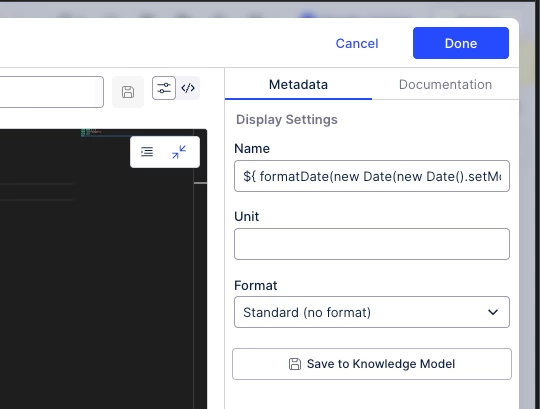
${ formatDate(new Date(new Date().setMonth(new Date().getMonth() - 1)), '%B') }


You would add this on the “Name” field in the PQL Editor: 


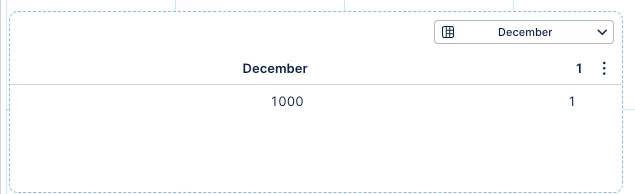
And then it looks like this when rendered on the view, in this case in a Table:


Hope this helps!


Documentation can be found here: https://docs.celonis.com/en/smart-inputs.html#UUID-38ac15e9-e5bf-bf1a-b0af-e5918c502213_section-idm234846450521641


Proper support for this syntax on the PQL editor fields will come shortly, stay tuned.