Question

Bulk Closure of Tasks in Task List Component

  • April 16, 2026
  • 3 replies
  • 29 views

mohan_kb
Level 4
Forum|alt.badge.img

I have trigger-based task list configured in a view. Is there any way to close the tasks in bulk instead of one by one?

3 replies

janpeter.van.d
Level 12
Forum|alt.badge.img+26

Hi ​@mohan_kb

I don’t think this is possible in the Task List Component. 
A workaround would be to create a table with row selection (either object where task is assigned to or listing all your tasks) and enable table actions with the help of an action flow (see https://docs.celonis.com/en/configuring-tables.html#UUID-b911539f-fa01-b98c-2cde-3a33c9bb1859_section-idm462997123291203399936753709

In your action flow you can use the ‘Update Task’ module to close the tasks, see https://docs.celonis.com/en/update-tasks--action-flow-.html

I hope this helps. 

Best regards, 
Jan-peter


mohan_kb
Level 4
Forum|alt.badge.img
  • Author
  • Level 4
  • April 17, 2026

Hi ​@janpeter.van.d ,


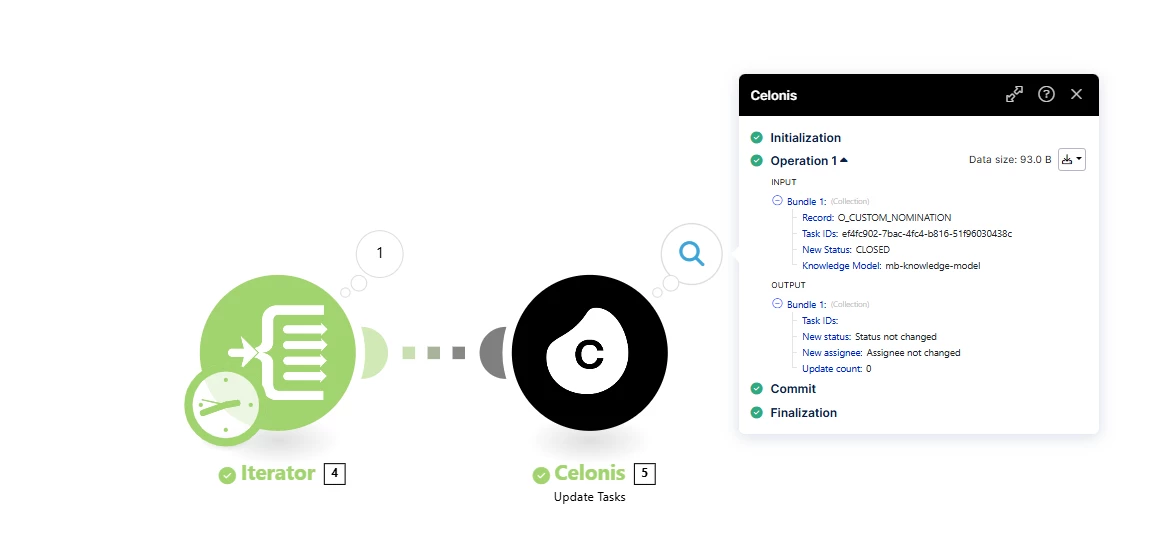
Thanks for your input. I tried the same. Unfortunately, the task status is not getting updated. Though I passed the correct task ID as below. 


janpeter.van.d
Level 12
Forum|alt.badge.img+26

Hi ​@mohan_kb

With the creation of your task trigger, this you checked the Data Model trigger? In the description of the ‘Update Tasks’ module, it says it only works only for Record-based Tasks (whatever that might be).

If this is all correct, it might be that the new Task Manager generates a new type of tasks that are not supported yet by the module. I would suggest to verify this with Celonis support. Happy to hear the outcome :)