

Question

string convert to date

  • October 2, 2026
  • 1 reply
  • 19 views

marietta.kalla
Level 3
Forum|alt.badge.img+1

Hi everyone,

During data extraction, I would like to convert a string field into a datetime format.

The original field format is: 2024-12-09

I would like to convert it to the following format: 2024-12-09 00:00:00.

Does anyone have any idea how I could do this?

I would really appreciate your help. Thank you! 😊
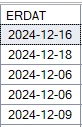
Β 

Β 

Β 

1 reply

gagan1
Level 12
Forum|alt.badge.img+6
  • Level 12
  • October 2, 2026

hi ​@marietta.kallaΒ ,
Β 

quick thing to try first--> in that format box, enter the format of your incoming value (yyyy-MM-dd), not the target format, and test it on a few records using Limit total number in the extraction settings. the docs don't explain that box, so if it doesn't work, the reliable way is to keep ERDAT as a string and convert it in a transformation:

steps:

  1. set ERDAT back to string in the extraction's type dropdown
  2. check the raw value with the extraction preview. if your screenshot is from SAP GUI, it shows dates in your user's date format, so the stored value could be 20241209 instead of 2024-12-09
  3. in a transformation, convert it like this:
SELECT *,
CAST(TO_DATE("ERDAT", 'YYYY-MM-DD') AS TIMESTAMP) AS "ERDAT_TS"
FROM "YOUR_TABLE";

TO_DATE reads the string and the cast to TIMESTAMP gives you 2024-12-09 00:00:00. if the raw value has no dashes, use 'YYYYMMDD' instead. a plain CAST("ERDAT" AS TIMESTAMP) is riskier, the docs say it only supports strings in the full YYYY-MM-DD HH:MI:SS format. if it errors or comes back empty, the format string doesn't match the raw value, so compare the two.

Docs for you and other future readers that may help -->

https://docs.celonis.com/en/to_date-function.html
https://docs.celonis.com/en/cast-function.html
https://docs.celonis.com/en/date-and-timestamp-format-elements.html

Β