Hello, for a complex formula, I need to substract two percentages in order to multiply it afterwards However, the formula including a filter is successful and consistent for a Count but not for an Avg (the result is inconsistent, far from the to-be result) :
Also, I tried to put the filter in a Case When where I obtain the percentage thanks to a division between the ‘Change Items’ (= Count) and the ‘PO Items Not Auto’ (= Count_Table’) but I have the error :
Please note that my client has the OnPremise Celonis, therefore some functions available on the Cloud may be not available here.
Any help would be the most welcome, thank you and have a good day !
Best regards
Best answer by .146003933
Hello Denis, thank your for your time !
Your advice is consistent, the formula is also way more readable and reemployable with variables
I finally succeed, I have not anymore the problem I had this morning with the Filter inside an AVG
I am a newbie on Celopeers, do you advise me to keep this post or to delete it ? I hesitate because I doubt my post is worth it but your answer may help some others
In those type of cases we like to store each of the calculations with its filter (which then needs to be in a case when statement) in a separate variable and later use those variables to get to the desired outcome within a new component.
Could you try this and let me know whether it worked?
Your advice is consistent, the formula is also way more readable and reemployable with variables
I finally succeed, I have not anymore the problem I had this morning with the Filter inside an AVG
I am a newbie on Celopeers, do you advise me to keep this post or to delete it ? I hesitate because I doubt my post is worth it but your answer may help some others
Your advice is consistent, the formula is also way more readable and reemployable with variables
I finally succeed, I have not anymore the problem I had this morning with the Filter inside an AVG
I am a newbie on Celopeers, do you advise me to keep this post or to delete it ? I hesitate because I doubt my post is worth it but your answer may help some others



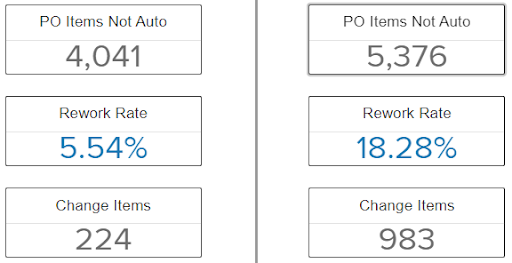 However, the formula including a filter is successful and consistent for a Count but not for an Avg (the result is inconsistent, far from the to-be result) :
 Also, I tried to put the filter in a Case When where I obtain the percentage thanks to a division between the ‘Change Items’ (= Count) and the ‘PO Items Not Auto’ (= Count_Table’) but I have the error :
