Question

Dear All & Celonis expertI would like to get advice, on how to convert the date format DD-MM-YYYY HH:MI:SS to YYYY-MM-DD HH:MI:SS?Your advice and support is appreciated. Thank YouBest Regards,Windu

  • October 12, 2023
  • 5 replies
  • 25 views

Detail:

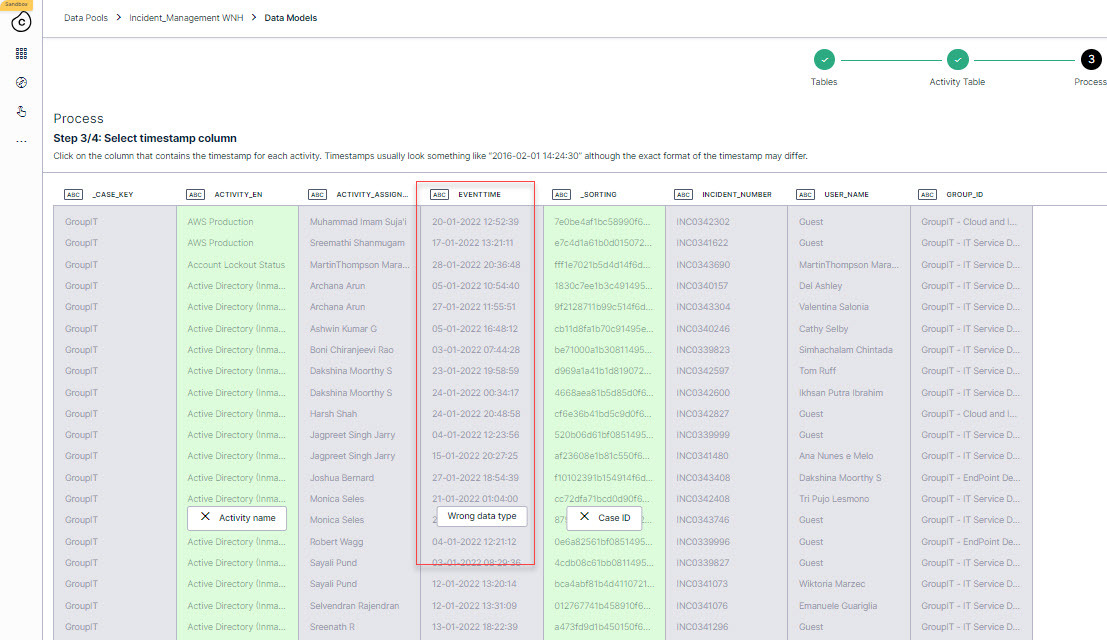
in our data model, the event time must with format YYYY-MM-DD HH:MI:SS. But my data source is DD-MM-YYYY HH:MI:SS. so this data is not available as event time.


I tried to follow : https://www.vertica.com/docs/9.2.x/HTML/Content/Authoring/SQLReferenceManual/Functions/Formatting/TemplatePatternsForDateTimeFormatting.htm


use query : TO_TIMESTAMP(Date_column, 'YYYY-MM-DD HH:MI:SS'); (attachment 5)


but the date format is not correct as below: 0028-01-20 00:00:00 (Attachment 3)


The original date is 28-01-2022 13:51:24 (as attachment 4)


5 replies

Forum|alt.badge.img+14

Dear Windu,


Not sure if there is an easier way to solve it, i always overcome this issue by playing with the characters.

In this case your could try something like (replace all the example dates with your datetime column):


Edit:

Just found an easier way:

SELECT TO_CHAR(TO_TIMESTAMP('28-01-2022 13:51:24', 'DD-MM-YYYY HH:MI:SS'), 'YYYY-MM-DD HH:MI:SS')


Yours,

Zsolt Borbely


sravana.p
Level 1
Forum|alt.badge.img+7
  • Level 1
  • October 13, 2023

Dear Windu,


Try to do this in Extraction level, please let us know if it resolved by following this.


image


  • Author
  • Level 2
  • October 16, 2023

Dear Windu,


Not sure if there is an easier way to solve it, i always overcome this issue by playing with the characters.

In this case your could try something like (replace all the example dates with your datetime column):


Edit:

Just found an easier way:

SELECT TO_CHAR(TO_TIMESTAMP('28-01-2022 13:51:24', 'DD-MM-YYYY HH:MI:SS'), 'YYYY-MM-DD HH:MI:SS')


Yours,

Zsolt Borbely


Dear Zsolt,


Thank you for for you support. This query is working for 1 conversion date. Do you have any idea if need to convert 1 column?


I have column 'event' in table 'Incident'. All data in column 'event' use format datetime with 'DD-MM-YYYY HH:MI:SS'

But I need to convert the format in the transformation became YYYY-MM-DD HH:MI:SS, because the data model used this format (YYYY-MM-DD HH:MI:SS).

1if you have any info, this is highly appreciated

 

Thank You Zsoft

Kind Regards,

Windu


  • Author
  • Level 2
  • October 16, 2023

Dear Windu,


Try to do this in Extraction level, please let us know if it resolved by following this.


image

Dear Sravana

Thanks a lot for your insight. Please correcting me, this menu is on the extraction -> choose the table -> configuration. Am I correct?

but I am not sure why for mine, there is no formatting on the right of 'DATETIME' as yours:

2 Any idea maybe?

Thank you Sravana

Kind Regards,

Windu


Forum|alt.badge.img+14

Dear Zsolt,


Thank you for for you support. This query is working for 1 conversion date. Do you have any idea if need to convert 1 column?


I have column 'event' in table 'Incident'. All data in column 'event' use format datetime with 'DD-MM-YYYY HH:MI:SS'

But I need to convert the format in the transformation became YYYY-MM-DD HH:MI:SS, because the data model used this format (YYYY-MM-DD HH:MI:SS).

1if you have any info, this is highly appreciated


Thank You Zsoft

Kind Regards,

Windu

Dear Windu,


You have to cast the column to timestamp in order to detect it as a date:

TO_CHAR(TO_TIMESTAMP("incident"."event", 'DD-MM-YYYY HH:MI:SS'), 'YYYY-MM-DD HH:MI:SS')::TIMESTAMP


Replace the bold part in the code to your table.column name.


Hope it helps. In case of further questions feel free to reach out.

Yours,

Zsolt Borbély