
Solved

Connect MongoDB – Database Type Issue

  • August 6, 2025
  • 3 replies
  • 157 views

michael.hamme13
Level 5
Forum|alt.badge.img+6

Hi everyone,

I’m trying to connect MongoDB to Celonis. At first, I assumed that I’d need to use a custom JDBC driver (based on a thread that I’ve read here and the Celonis documentation).

However, when I reached the step to select the “Database Type” in the connector, I couldn’t find a fitting option for MongoDB.

Has anyone successfully set this up?

  • Should I use a specific Database Type in this case?
  • Or is there another workaround to get MongoDB connected?

Thanks for any tips or guidance! 

Best answer by yingtao.gu13

The driver question tripped me up too. Counterintuitively, you need to use the MySQL driver for MongoDB connections, not a MongoDB-specific one, so "MySQL" is the Database Type you're looking for. Version matters too: 5.1.44 is the one that works, MySQL Connector 6.x, 8.x or newer aren't compatible with the BI Connector.

MongoDB's own JDBC driver isn't supported in this context. The correct combination is the MySQL driver (v5.1.44) together with the MongoDB Connector for BI.

3 replies

Jan-Peter van der Steege
Level 12
Forum|alt.badge.img+26

Hi ​@michael.hamme13, 


I’ve not connected to MangoDB myself, but can share some experiences for other drivers. 

Since the Database is not directly supported by Celonis, I assume you’re right to add the custom driver to the extractor. 
In the section ‘select database type’ in the data connection, choose the SQL variant that fits the best for your use case. In my experience, the Microsoft SQL is a safe choice. It’s SQL-92 Compliant, as is MangoDB SQL. If this doesn’t work, you can try other variants easily. 

I hope this helps!

Best regards,
Jan-peter


yingtao.gu13
Level 8
Forum|alt.badge.img+13
  • Level 8
  • Answer
  • September 17, 2026

The driver question tripped me up too. Counterintuitively, you need to use the MySQL driver for MongoDB connections, not a MongoDB-specific one, so "MySQL" is the Database Type you're looking for. Version matters too: 5.1.44 is the one that works, MySQL Connector 6.x, 8.x or newer aren't compatible with the BI Connector.

MongoDB's own JDBC driver isn't supported in this context. The correct combination is the MySQL driver (v5.1.44) together with the MongoDB Connector for BI.


Jan-Peter van der Steege
Level 12
Forum|alt.badge.img+26

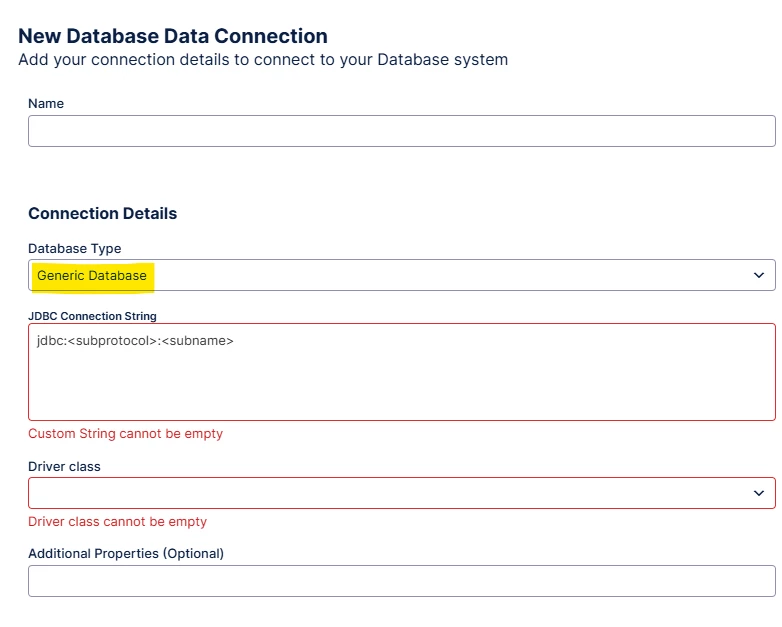
One addition for follow-up readers: quite recently Celonis added the option to select a ‘Generic Database’ type, if your source database is not one of the pre-defined templates of Celonis. 

More information can be found here: https://docs.celonis.com/en/connecting-to-generic-database.html. 

It might be that for MongoDB you can add the MongoDB driver and select the source as ‘generic database’ for optimal performance, but that’s not something I tested in practice. 

In my case, I used MySQL for a very specific database type, resulting in all kind of unresolved checks that were done by Celonis. This didn’t break the connection, but was resulting in errors in the log which was questioned by the IT department. By using the Generic Database, this issue was resolved.