Question

How to define custom KPIs in nodes?

  • Feb 24, 2020 4:01 PM UTC
  • 7 replies
  • 161 views

Dear Celonis community, Is it possible to define custom KPIs in the process graphs nodes? E.g. I imported an event log containing a column with numeric values (price) but I cant find an option to display them instead of the case frequencies. Thank you for your support. Best regards, Daniel

7 replies

Erin Ndrio
Celonaut
Forum|alt.badge.img
  • Celonaut
  • Feb 24, 2020 4:18 PM UTC
Hi Daniel, I think what you are looking for is the custom KPI. image356514 29.4 KB

  • Feb 24, 2020 6:20 PM UTC
Unfortunately I do not see the Add Custom KPI View link. image498579 35.4 KB

Erin Ndrio
Celonaut
Forum|alt.badge.img
  • Celonaut
  • Feb 25, 2020 2:09 PM UTC
I see. The reason here is because you are not in edit mode. Please switch to edit mode in order to do that. On the top right side there is a toggle Edit

  • Feb 26, 2020 10:54 AM UTC
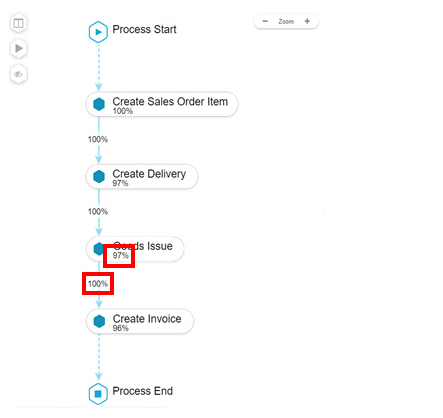
Also when you switch to the edit mode, there is the possibility to create custom KPIs under the burger menu right next to the celonis sign. However, I currently struggle with creating a KPI, which should display the percentages of connections going to the next activity. Right now I can only get the total percentage of the entire cases with COUNT_TABLE(EKPO) / GLOBAL(COUNT_TABLE(EKPO)) Unfortunately I want to have something as follows: Can you help me out here @e.ndrio how I have to change the formula? Thank you really much

Erin Ndrio
Celonaut
Forum|alt.badge.img
  • Celonaut
  • Feb 26, 2020 11:38 AM UTC
is it possible for you to go to analysis settings and go to the option Process Explorer KPIs image705113 5.29 KB

  • Feb 26, 2020 12:05 PM UTC
Thanks for the quick response. Do you have the formula for that, though? I do not know how I can put that into code such that every connection has the % value instead of the absolutes, as it is done in the picture above. Would appreciate any help!

Erin Ndrio
Celonaut
Forum|alt.badge.img
  • Celonaut
  • Feb 27, 2020 2:31 PM UTC
This is a new question. I will have to check that.