

Building a basic automation is a great start - but handling complex, real-world data is where things get interesting.
In the "Master Data Wrangling in Action Flows" case study, we tackle a common hurdle: processing multiple user inputs simultaneously. While the course guides you through a functional solution for a “Currency Converter”, it leaves you with a final architectural puzzle to solve on your own.
The Challenge: Efficiency vs. Effort ⚙️
The standard setup fires a separate HTTP request for every single currency selected. We want to see if you can build a more efficient "Version 2.0":
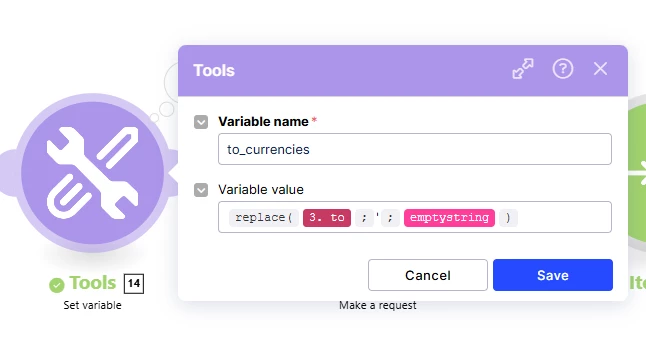
- Can you clean the data string before it hits the HTTP module?
- Can you consolidate the logic to send one single request for all currencies at once?
👇 Join the discussion
This is your anchor post to share your findings and compare notes with others:
- Share a screenshot of your optimized logic (especially how you handled the string cleaning).
- Which functions did you use? Tell us your go-to combo for prepping the data.
- Stuck on the results list? If the HTML formatting or the aggregator gave you trouble, ask a question here!
🤔 New to Action Flows?
This case study is a key part of our Build Action Flows track. If you’re ready to move beyond basic triggers and start building robust data pipelines, jump into the track and see how you handle the "Multi-Select" puzzle.
Nicole from the Academy team